StoreFront Studio vs MockUPhone & StudioMockup: complete App Store pipeline vs single wrappers
Free single-image bezel wrappers like MockUPhone are handy when you just want to drop one screenshot inside a transparent phone frame for a blog post or README. They do not produce ready-to-submit App Store Connect screenshot sets: they omit opaque Exact-Spec backgrounds, headline typography, multi-size iPad adaptation, localization, and direct App Store Connect uploads — all of which StoreFront Studio handles in one app.
1. Finished App Store slides vs bare transparent bezel PNGs
Wrapping a capture in MockUPhone gives you a cutout PNG of a device with transparent corners — which App Store Connect immediately rejects because Apple forbids alpha channels and requires exact canvas dimensions like 1320 × 2868 px or 2064 × 2752 px. You still have to open a second editor to build backgrounds, align ten slides, and write benefit headlines.
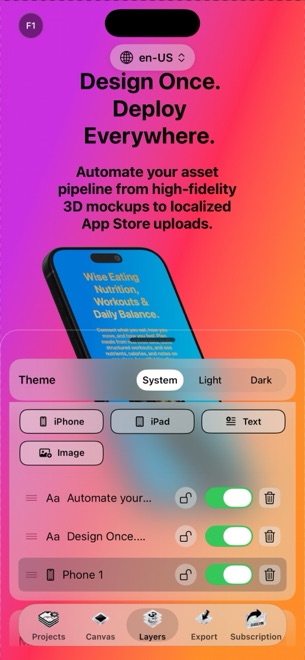
StoreFront Studio builds the entire finished storefront slide in one step: RealityKit 3D iPhone and iPad models, studio lighting, multi-color linear or radial background gradients, and bold headlines with per-word inline gradients.
| Requirement | StoreFront Studio | MockUPhone / Bezel Wrappers |
|---|---|---|
| App Store Connect ready output | Yes — exact Apple dimensions with opaque full-bleed backgrounds | No — outputs bare framed cutouts needing a second layout app |
| 3D camera, lighting & materials | Interactive RealityKit 3D rotation, studio light, materials & DOF | Fixed flat 2D or static pre-rendered angles |
| Headline & gradient typography | Desktop fonts, weights & per-word inline gradients built in | None (bezel wrapper only) |
| Multi-slide set consistency | Design full screenshot set on one responsive project canvas | One image wrapped at a time |
2. Scaling across sizes, languages, and App Store Connect
Single-frame wrappers turn release day into a daisy chain: capture in Simulator, wrap in browser, download PNGs, import into Keynote or Figma, duplicate for 6.5-inch and 13-inch iPad, translate into five languages, export 100 files, and drag them into Safari.
StoreFront Studio collapses that entire chain onto your Mac, iPad, or iPhone. One design follows across required Apple sizes, the built-in AI copywriter drafts and translates headlines per storefront, and one bulk API upload sends everything straight to App Store Connect.
| Pipeline stage | StoreFront Studio | Single-Frame Wrapper + Slide App |
|---|---|---|
| Number of tools required | 1 native app (StoreFront Studio) | 3+ tools (wrapper + layout editor + Safari ASC) |
| Adapting to 13" iPad & legacy slots | Automatic layout adaptation from one canvas | Manual re-wrapping and slide rebuilding per size |
| Storefront localization | On-canvas AI translation + bulk multi-locale API push | Manual copy-paste and folder sorting |
| Fixing one UI screenshot before launch | Swap capture once on 3D model & re-upload via API | Re-wrap, re-import, re-export, and re-drag into Safari |
3. Free vs Pro: when a simple wrapper is enough
If you need one transparent phone graphic for a GitHub README or press kit slide, a quick bezel wrapper does that single job. Whenever you are preparing actual App Store product pages where your first three portrait screenshots determine tap-through rate in search results, a dedicated storefront studio pays for itself immediately.
StoreFront Studio is free to download and design in without an account, and Pro removes ads and watermarks for $3.99/mo, $39.99/yr, or $49.99 once.
| Deliverable | Best choice | Why |
|---|---|---|
| Single transparent device image for a README or deck | Bezel wrapper (or Apple PNG bezel) | Quick cutout when no App Store canvas or headline is needed |
| Complete 5–10 slide App Store listing (iPhone & iPad) | StoreFront Studio | Exact dimensions, 3D lighting, headline engine & opaque export |
| Localized multi-language App Store release | StoreFront Studio | Built-in AI translation + one-step App Store Connect API upload |
Can I upload MockUPhone outputs directly into App Store Connect?
Usually no — wrapped cutouts contain transparent alpha channels or non-standard dimensions that App Store Connect rejects unless placed onto an exact-size opaque canvas first.
Does StoreFront Studio include both the 3D device frame and the headline canvas?
Yes. It combines RealityKit 3D iPhone and iPad models, studio lighting, background gradients, rich headline typography, and App Store Connect uploading in one app.
How fast can I build a complete screenshot set in StoreFront Studio?
Most developers go from raw Xcode Simulator captures to a finished, uploaded App Store Connect set in under an hour.
Is StoreFront Studio free to try?
Yes. Every editor feature is free (supported by AdMob ads, a pre-export rewarded ad, and a small watermark); Pro ships clean exports starting at $3.99/month or $49.99 lifetime.