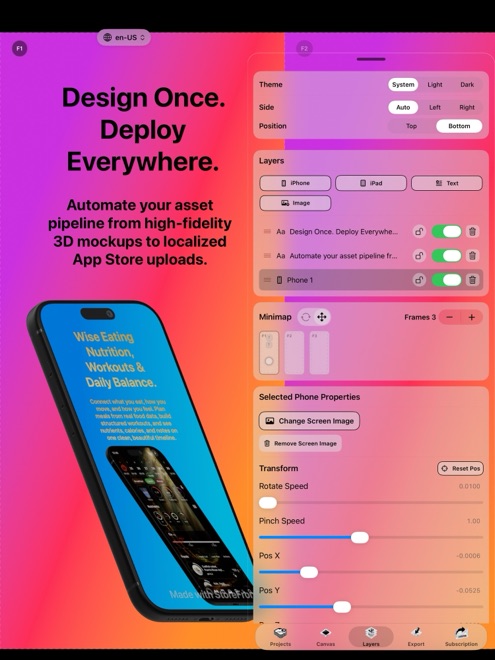
StoreFront Studio vs Launchmatic: $3.99/mo or $49.99 lifetime vs cloud SaaS screenshot tiers
Launchmatic targets cross-platform teams looking for browser-based templates and automated cloud localization across Google Play and the App Store. If you build for Apple platforms, StoreFront Studio replaces recurring per-tier web subscriptions with a native iPhone, iPad, and Mac RealityKit 3D studio, built-in AI storefront copywriting, local Keychain App Store Connect uploads, and a $49.99 lifetime Pro option.
1. Native RealityKit 3D customization vs cloud template generators
Browser generators like Launchmatic speed up template selection across Android and iOS, yet browser layouts remain constrained to predefined frame slots and web typography. When five apps in your category pick the same web template, search results start looking identical.
StoreFront Studio gives you a full RealityKit 3D stage natively on macOS, iPadOS, and iOS 26: rotate and light 3D iPhones and iPads, toggle real materials and depth of field, and apply per-word linear or radial gradients inside a single headline sentence.
| Area | StoreFront Studio | Launchmatic |
|---|---|---|
| Platform type | Native iOS 26, iPadOS & macOS app | Browser-based cloud SaaS |
| 3D mockup engine | Live RealityKit 3D iPhone & iPad models + studio lighting | Preset cloud templates (2D & pre-rendered frames) |
| Typography & gradients | Inline per-word gradients, multi-stop backgrounds, layer borders/radii | Web template font & color pickers |
| Apple multi-size workflow | One canvas adapts across 6.9", 6.5", 13" iPad & legacy slots | Cloud multi-size export (Apple + Google Play) |
| Android / Play Store support | Not included (Apple App Store specialist) | Included |
2. Flat unlimited locales & local Keychain security
Cloud screenshot platforms often meter translation credits, active project counts, or localized export slots across Bronze/Silver/Pro web plans — meaning localizing a portfolio of five apps into fifteen storefronts pushes you into expensive monthly tiers.
StoreFront Studio neither meters project counts nor stores your App Store Connect .p8 key in a web database. You generate and adapt storefront headlines on the canvas with the built-in AI copywriter and bulk-upload every size and language directly from your device Keychain over TLS.
| Check | StoreFront Studio | Launchmatic |
|---|---|---|
| Project & app count caps on Pro | Unlimited local projects on your Apple devices | Tiered by subscription plan |
| Storefront localization workflow | On-canvas AI copywriter & storefront adaptation + bulk ASC push | Cloud translation & template export |
| Where .p8 API key is stored | Local Apple device Keychain only | Cloud account if API integration is enabled |
| Signup required to test editor | None — zero account creation | Email / OAuth web signup required |
3. Three-year cost comparison for indie developers and studios
Over thirty-six months, even a modest $20–$39/month cloud screenshot tool costs $720 to $1,400+ — for software you might only open during release weeks. StoreFront Studio Pro costs $49.99 once forever (or $3.99 for a single launch month, $39.99/year).
Unless you specifically need Google Play Android device frames inside a browser tab, owning a native Apple 3D screenshot studio outright keeps your overhead near zero.
| Horizon or requirement | StoreFront Studio | Launchmatic |
|---|---|---|
| Single launch-month cost | $3.99 (cancel anytime in Apple Settings) | Higher monthly SaaS fee |
| 3-year total cost (Pro) | $49.99 total via Lifetime Pro IAP | 36 × monthly or 3 × annual SaaS renewals |
| Free tier capabilities | Full 3D editor, AI copy & ASC upload (ads + watermark) | Restricted trial exports / watermarks |
| Best fit | iPhone, iPad & Mac devs wanting 3D polish & permanent ownership | Cross-platform Android + iOS browser teams |
Does StoreFront Studio charge extra when I add more App Store languages?
No. StoreFront Studio has no per-locale or per-project add-on fees; Pro is a flat $3.99/mo, $39.99/yr, or $49.99 lifetime purchase.
Can StoreFront Studio’s AI copywriter adapt headlines culturally rather than word-for-word?
Yes. The built-in AI assistant writes headlines to App Store marketing guidelines and adapts them per storefront right on your canvas.
Do I have to upload my screenshots to Arte Soft servers to publish?
No. Rendering happens locally on your iPhone, iPad, or Mac, and uploads go directly from your device to Apple’s App Store Connect API over TLS.
What if I also maintain an Android version on Google Play?
StoreFront Studio focuses solely on Apple’s App Store (iPhone and iPad models plus App Store Connect); use a Play-compatible tool if you need Android hardware frames.