StoreFront Studio vs AppScreens: native 3D Apple studio and $49.99 lifetime vs web SaaS
AppScreens is a capable browser SaaS when your team ships simultaneously to Google Play and the Apple App Store and wants shared web templates in Chrome. StoreFront Studio is built natively for iPhone, iPad, and Mac developers who want interactive RealityKit 3D hardware lighting, inline per-word gradient headlines, App Store Connect uploads authenticated from their own Apple Keychain, and a $49.99 one-time Pro option instead of ongoing web SaaS bills.
1. Native RealityKit 3D rendering vs browser template presets
Web screenshot generators assemble slides inside a browser DOM or server render queue, which makes quick 2D and preset-angle templates easy to pick from a gallery. When you want to rotate a titanium iPhone a few degrees, shift studio rim lighting off a dark-mode chart, or dial in depth of field interactively, fixed web presets quickly hit a ceiling.
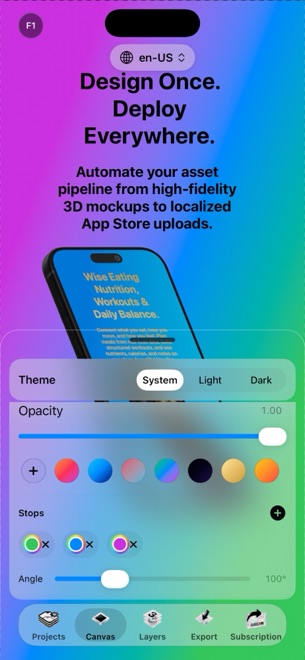
StoreFront Studio renders real 3D iPhone and iPad hardware locally using Apple’s RealityKit engine on iOS 26, iPadOS, and macOS. You position, scale, and angle devices in real 3D space, toggle physically accurate materials on or off, and style single-sentence headlines with per-word linear or radial gradients on one responsive canvas.
| Capability | StoreFront Studio | AppScreens (Web SaaS) |
|---|---|---|
| Runtime environment | Native app on iPhone (iOS 26+), iPad & Mac | Cloud web application in desktop browser |
| 3D device rendering | Interactive RealityKit 3D models, materials, studio light & DOF | Preset 2D/3D web templates rendered in browser/cloud |
| Inline typography styling | Per-word colors & multi-stop linear/radial gradients in one sentence | Template text boxes with web font styling |
| Multi-size Apple adaptation | One canvas adapts to 6.9", 6.5", 13" iPad & older Apple slots | Responsive multi-size template resizing |
| Android / Google Play frames | Not included (focused exclusively on Apple App Store) | Included alongside Google Play Console export |
| Account requirement to edit | None — open the app and design locally without signing up | Web account registration required |
2. App Store Connect API key security and localization flow
Both tools eliminate dragging hundreds of localized PNGs into Safari by talking to Apple’s App Store Connect API, and both offer AI-assisted headline translation. The architectural difference is where your live store credentials live: connecting a cloud web dashboard requires uploading your Issuer ID, Key ID, and downloadable .p8 private key onto a third-party server.
In StoreFront Studio, your App Store Connect API key stays inside your local device Keychain on your Mac, iPad, or iPhone and connects directly to Apple over TLS only when you trigger a bulk upload. Projects stay on your hardware, and AI copywriting sends only the app context you explicitly submit when asking for headlines or translations.
| Workflow & security check | StoreFront Studio | AppScreens (Web SaaS) |
|---|---|---|
| Where .p8 ASC private key lives | Local iOS, iPadOS, or macOS Keychain only | Uploaded to and stored by cloud SaaS backend |
| Direct TLS path to Apple API | Device directly to App Store Connect API | Vendor cloud server to App Store Connect API |
| AI headline copy & translation | Built-in on-canvas AI copywriter (opt-in per prompt) | Cloud AI translation & caption tools (plan-dependent) |
| Local project ownership | Stored locally on your Apple device; zero vendor lock-in | Stored in vendor cloud workspace |
| Offline layout & 3D staging | Full 3D canvas & typography work locally offline | Requires active browser connection |
3. Subscription tiers vs $49.99 one-time lifetime math
Screenshot tools have spiky usage: an indie developer or small studio sprints hard during launch week, ships localized updates every couple of months, and should not have to pay $25–$70 every idle month just to keep templates editable. StoreFront Studio’s entire 3D editor, AI copywriter, and uploader work in the Free tier (supported by AdMob ads, a rewarded ad before export, and a small export watermark).
Upgrading to StoreFront Studio Pro costs $3.99/month, $39.99/year, or $49.99 once forever — changing only three things: ads disappear, the watermark disappears, and exports run immediately.
| Scenario or cost horizon | StoreFront Studio | AppScreens |
|---|---|---|
| Free evaluation scope | Full 3D editor, AI copy & ASC upload (ads + watermarked export) | Limited free tier with project/export restrictions |
| Monthly launch-sprint option | $3.99/month via Apple In-App Purchase | Higher monthly SaaS plans |
| Annual or permanent license | $39.99/year or $49.99 one-time Lifetime Pro | Recurring monthly/annual SaaS billing only |
| Best for Apple-only devs & studios | Strong fit: native RealityKit 3D + local Keychain + $49.99 once | Overkill unless browser seat sharing is mandatory |
| Best for simultaneous Android + iOS | Pair with separate Play asset workflow | Strong fit: unified Google Play + App Store web dashboard |
Does StoreFront Studio hold back 3D models or ASC uploads on the free tier?
No. Every 3D model, gradient tool, AI copywriter prompt, and App Store Connect upload works for free; Pro ($3.99/mo, $39.99/yr, or $49.99 lifetime) only removes AdMob ads, the pre-export rewarded ad, and the watermark.
Can StoreFront Studio generate Google Play Android screenshots like AppScreens?
No. StoreFront Studio is purpose-built for Apple platforms, rendering RealityKit 3D iPhone and iPad models and uploading directly to App Store Connect.
Is my App Store Connect .p8 key safer in StoreFront Studio than a web app?
Your .p8 key never leaves your local Apple device Keychain except over encrypted TLS directly to Apple’s App Store Connect API, avoiding third-party server storage.
Does StoreFront Studio Pro restore across my Mac, iPad, and iPhone?
Yes. Pro is a standard Apple In-App Purchase tied to your Apple ID and restores across your compatible iOS 26, iPadOS, and macOS devices.