App Store Connect .p8 API Key Security: Local Apple Keychain vs Cloud SaaS Uploaders
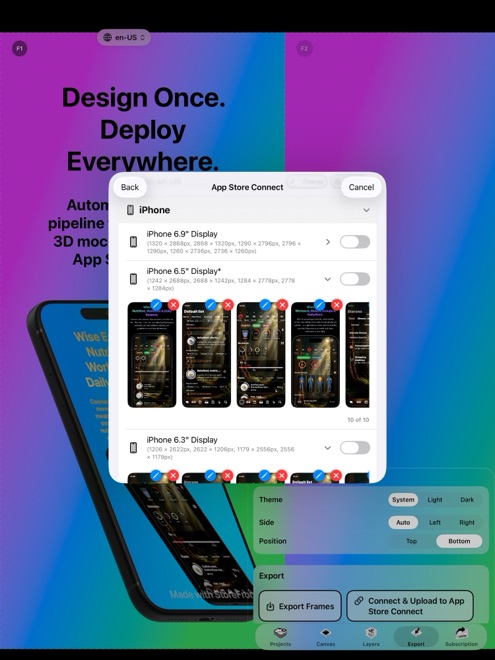
An App Store Connect API key with App Manager or Admin permissions can modify live store listings, pricing metadata, and version screenshots across your developer account. Uploading that `.p8` private key to a browser screenshot SaaS puts a high-privilege credential onto someone else’s cloud servers, whereas StoreFront Studio stores your key strictly inside your local Apple device Keychain and connects directly to Apple over TLS.
1. What an App Store Connect .p8 API key can actually access
To create and replace screenshot sets via Apple’s official App Store Connect API, a team key typically needs App Manager or Admin role access. While Apple allows scoping keys to specific apps when configured carefully, many developers generate account-wide keys that remain valid indefinitely until manually revoked.
Handing a non-expiring `.p8` key to three different web marketing dashboards expands your supply-chain surface: any database breach or compromised worker on a third-party SaaS exposes live write access to your App Store presence.
| Security dimension | StoreFront Studio (Local Native App) | Cloud Web Screenshot SaaS |
|---|---|---|
| Where .p8 private key is stored | Encrypted local iOS, iPadOS, or macOS Keychain | Vendor cloud database / secret store |
| Does vendor ever receive the key? | Never — Arte Soft has no backend receiving your key | Yes — uploaded via web form to vendor server |
| Network path for JWT bearer token | Signed locally on device → TLS straight to api.appstoreconnect.apple.com | Signed on vendor server → TLS to Apple |
| Where unannounced UI screenshots live | Locally on your Apple hardware | Uploaded to third-party cloud storage buckets |
| Revoking / deleting local copy | Delete anytime in StoreFront Studio settings + revoke in ASC | Delete in web portal + revoke in ASC to be certain |
2. Least-privilege hygiene when setting up your API key
Even with local Keychain storage, good credential hygiene takes less than two minutes inside App Store Connect under Users and Access → Integrations → App Store Connect API.
Create a dedicated key named clearly (for example, `StoreFront Studio Local Mac`) so you never share one `.p8` file across CI servers and desktop tools, and restrict app access if your account also houses client or unrelated apps.
| Setup choice | Recommended setting | Why |
|---|---|---|
| Key label in App Store Connect | Dedicated descriptive name per machine/tool | Lets you revoke one key cleanly without breaking CI |
| Role assignment | App Manager (rather than Admin where possible) | Sufficient to upload version localizations & screenshots |
| Backup of AuthKey_<ID>.p8 | Encrypted password manager + local Keychain | Apple allows downloading the .p8 file only once at creation |
| Upload network architecture | Local native app (StoreFront Studio or local CLI) | Keeps private key off external multi-tenant web servers |
3. Privacy across the rest of your screenshot workflow
Pre-release screenshots often reveal unshipped features, pricing tiers, or client prototypes weeks before public launch. StoreFront Studio requires zero user account, stores projects and exports locally on your device, and sends text to the AI copywriter only when you explicitly request a headline or translation.
Note that the Free version displays Google AdMob ads (respecting your iOS App Tracking Transparency choice); upgrading to Pro ($3.99/mo, $39.99/yr, or $49.99 once) removes AdMob activity completely alongside the watermark.
| Data type | Where it goes in StoreFront Studio | User control |
|---|---|---|
| Canvas projects & raw UI screenshots | Processed & saved locally on your device only | Delete local projects/exports anytime |
| App Store Connect .p8 key & Issuer ID | Local Keychain → Apple ASC API over TLS on upload | Remove key from app settings anytime |
| AI copywriter prompts | Sent to AI model only when you explicitly ask for copy | Optional; review all drafts before publishing |
| AdMob SDK (Free tier only) | Serves ads under ATT choice in Free version | Removed completely when you purchase Pro |
Does StoreFront Studio ever upload my .p8 file to Arte Soft servers?
No. Your Issuer ID, Key ID, and .p8 private key stay in your device’s local Keychain and talk solely to Apple’s official App Store Connect API over TLS.
Do I need to enter my Apple ID password or 2FA code in StoreFront Studio?
No. Apple’s official App Store Connect API uses token-based .p8 keys specifically so apps never ask for your Apple ID password.
What happens if I get a new Mac or iPad?
Restore your StoreFront Studio Pro purchase via your Apple ID and import your saved .p8 key (or generate a fresh key in App Store Connect) into the new device’s Keychain.
Does buying StoreFront Studio Pro stop ad network data collection?
Yes. Pro removes the ads and with them Google AdMob’s activity in the app.