App Store Custom Product Pages (CPP) & PPO Variants vs Single Default Listing
A single default App Store listing forces every visitor — whether searching "offline PDF scanner," "receipt tax tracker," or "sign contracts" — to read the exact same generic first three screenshots. Apple gives every developer up to 35 Custom Product Pages (CPP) plus free Product Page Optimization (PPO) tests, and StoreFront Studio makes producing clean 3D variant sets fast enough that indie teams actually use them.
1. Default product page vs Product Page Optimization (PPO) vs Custom Product Pages (CPP)
Apple offers three distinct listing surfaces inside App Store Connect at zero extra Apple fee. Your Default Product Page greets organic browse and general brand searches; PPO split-tests up to three alternative icon/screenshot treatments on organic visitors; and CPPs give you up to 35 unique shareable URLs (and Apple Search Ads ad-group targets) with tailored screenshots and promotional text.
When a user clicks an Apple Search Ad or blog link about "meal prep macros" and lands on a CPP whose first three 3D screenshots speak directly to macro tracking rather than generic recipe browsing, message match jumps.
| Surface | Default Product Page | Product Page Optimization (PPO) | Custom Product Pages (CPP) |
|---|---|---|---|
| Primary traffic source | General organic search & browse | Random split of organic App Store visitors | Apple Search Ads keyword groups, social & web URLs |
| Maximum active variants | 1 per locale | Up to 3 treatments vs baseline | Up to 35 custom pages per app |
| Requires new Xcode binary? | Tied to app version submission | No — test screenshots on current live Ready for Sale build | No — submit CPP metadata independently of code |
| Apple platform fee | Included ($99/yr dev program) | Included free | Included free |
2. Why production friction stops teams — and how 3D projects fix it
Most developers leave all 35 CPP slots empty because duplicating Figma artboards across 6.9-inch iPhone and 13-inch iPad for four audience angles means slicing and exporting another hundred PNG files by hand.
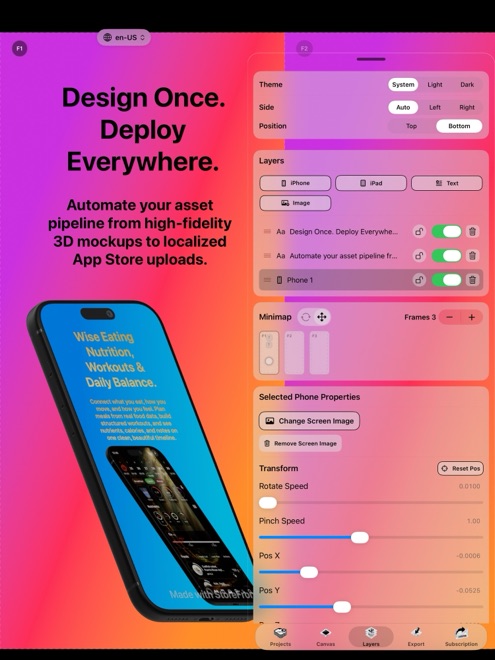
In StoreFront Studio, your 3D lighting, materials, fonts, and multi-size layout already live on one responsive canvas. Spinning up a targeted CPP variant is simply swapping slot one’s UI screen, asking the built-in AI copywriter for three audience-specific benefit headlines, highlighting the target keyword with an inline per-word gradient, and exporting clean Pro assets.
| Variant type | What changes from Default set | Effort in StoreFront Studio |
|---|---|---|
| Keyword-intent CPP (Search Ads) | Reorder hero UI to slot 1 + rewrite first 3 headlines for exact query | ~10 minutes from existing project |
| PPO Angle Test (3D vs 0° flat) | Keep copy identical; test 12° lit 3D hero vs 0° front-on frames | ~5 minutes using live RealityKit sliders |
| PPO Palette Test (Dark vs Light) | Switch backdrop gradient & studio rim light; keep UI & copy steady | ~5 minutes on canvas |
| Seasonal / WWDC / Back-to-School | Update accent gradient + seasonal outcome headline | ~10 minutes across phone & 13" iPad |
3. Keeping every variant App Review compliant
Remember that every CPP and PPO screenshot variant still goes through App Store Review metadata checks under Guideline 2.3. Even without a binary upload, screenshots must show real functionality present in your currently live build, use matching iPhone or iPad hardware frames per slot, and contain zero watermarks or alpha channels.
Upgrade to StoreFront Studio Pro ($3.99/mo, $39.99/yr, or $49.99 once forever) before exporting CPP and PPO sets so every file ships watermark-free and flattened.
| Stage | Recommended focus | Why |
|---|---|---|
| Pre-launch v1.0 with low impression volume | 1 sharp Default listing + key localized storefronts | PPO needs steady organic impressions to reach statistical confidence |
| Running Apple Search Ads on 2+ distinct use cases | 1 CPP per distinct ad-group intent | Aligns first 3 search/landing screenshots with exact search term |
| Established app with steady daily downloads | Run 1 single-variable PPO test per month | Compounds conversion gains using real App Store Analytics |
Do I have to submit a new app binary to test screenshots in PPO or CPP?
No. Both Product Page Optimization treatments and Custom Product Pages can be submitted for metadata review against your already-approved Ready for Sale app version.
How many Custom Product Pages does App Store Connect include?
Apple includes up to 35 Custom Product Pages per app at no extra charge beyond your standard Apple Developer Program membership.
Should I change headlines, 3D angles, and colors all at once in a PPO test?
Changing one variable at a time — such as headline promise first, then dark vs light 3D backdrop next — tells you clearly what actually moved conversion.
Can I export clean exact-dimension PNGs locally from StoreFront Studio for CPPs?
Yes. StoreFront Studio Pro exports clean, watermark-free images across every required iPhone and iPad dimension right onto your Mac, iPad, or iPhone.