How to Write App Store Headlines That Convert
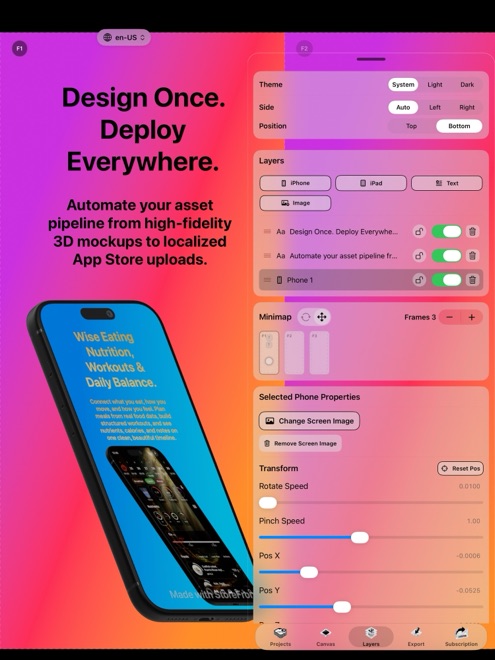
Nobody downloads an app because slide one says "Welcome to Dashboard v2.4." Shoppers tap Get when five crisp words above your screenshot name the exact job your app solves for them. StoreFront Studio pairs a headline-ready text engine with an AI copywriter tuned to App Store marketing guidelines so you never stall on blank text boxes.
Lead with the outcome, not the menu label
Developers naturally label screenshots after internal navigation tabs: "Calendar View," "Export Settings," or "Custom Filters." To a stranger scrolling App Store search results, a feature noun does not explain why that screen saves time or frustration.
Rewrite every noun into a concrete verb-first outcome under six or seven words. "Split Group Trip Costs in Seconds" communicates value immediately, while the screenshot underneath proves how clean the interface is.
- Aim for four to seven words across at most two short lines.
- Start with an active verb or clear outcome ("Scan Receipts Offline," "Plan Meals in Five Minutes").
- Give every slide exactly one promise instead of stacking three sub-bullets.
Stay inside Apple's App Store marketing boundaries
Screenshot text is reviewed as app metadata alongside your description and subtitle. Unverifiable superlatives like "#1 Best App in the World," competitor name-dropping, or pricing claims that go stale across currencies frequently trigger metadata rejections.
Keep claims factual and anchored to capabilities visible inside the current build users can download today. If a feature requires a Pro subscription, avoid wording that falsely implies unlimited free access.
Generate and refine headline options right on the canvas
Writing ten distinct, non-repetitive headlines after a long coding sprint is surprisingly draining. StoreFront Studio includes a built-in AI copywriter trained around App Store marketing conventions so you can generate tight drafts without switching to a browser.
Only the app description context you explicitly submit is sent when you request copy, and you stay in full control of editing every word before publishing.
- Describe the specific screen's core benefit in one plain sentence inside StoreFront Studio's AI copywriter.
- Request concise benefit-led headline suggestions tailored for App Store screenshots.
- Pick the sharpest line, trim any filler adjectives, and verify that every claim matches your shipping app.
- Highlight the single strongest keyword in the sentence with a contrasting color or gradient so skimmers catch it instantly.
Read the first three headlines together as one sentence
In portrait App Store search results, shoppers see your first three screenshots side by side before ever tapping into your product page. If all three slides repeat the same generic tagline in slightly different words, you waste two-thirds of your storefront.
Read slides one, two, and three aloud in order: slide one states the primary promise, slide two shows the fastest everyday workflow, and slide three answers the biggest trust or differentiator question.
How many words should an App Store screenshot headline be?
Four to seven words split cleanly over two lines is easiest to read inside small App Store search result thumbnails.
Does StoreFront Studio's AI copywriter read my project automatically?
No. Text about your app is sent to the model only when you explicitly ask for a headline or translation, and you review every draft on the canvas.
Can screenshot text cause an App Store rejection?
Yes. Misleading promises, unverifiable "#1" rankings, or naming rival apps in screenshot captions can trigger metadata rejection under App Review rules.