How to Localize App Store Screenshots at Scale
Localizing your app binary and store description while leaving English screenshots in Tokyo, Berlin, and Madrid cuts conversion right at the finish line. Shoppers decide visually first, and native-language headlines signal immediately that your app supports their region. StoreFront Studio lets you translate and adapt captions on the canvas and bulk-upload every localized set to App Store Connect.
Prioritize storefronts where localized visuals move the needle
You do not have to launch thirty-nine App Store localizations on day one if you are a solo developer. Starting with five to ten major storefronts where your app already works well — such as German, Spanish, French, Japanese, Korean, Portuguese, and Italian — captures huge non-English search demand.
Even if your in-app UI remains in English for certain technical tools, make sure localized headlines never falsely promise a translated interface when the app itself is English-only. Best conversion happens when both your UI and screenshot headlines speak the local language.
- Match App Store Connect locale codes (such as de-DE, fr-FR, es-ES, ja, and pt-BR).
- Adapt idioms and benefit phrasing rather than translating slang word for word.
- Keep localized UI captures honest to what downloads in that storefront.
Design master headlines with room for thirty-percent expansion
A crisp four-word English headline that barely fits edge to edge at 72 pt font size will almost certainly overflow in German, French, Spanish, or Russian, where phrases routinely run twenty to thirty-five percent longer. Conversely, Japanese and Chinese characters pack dense meaning into far fewer glyphs but need clean line breaks.
Leave generous side padding and room for a third line when building your English master canvas so translated variants rarely require shrinking your 3D device frames.
Translate, adapt, and push from a single workflow
Copying strings out to spreadsheets, pasting them back into design layers, exporting hundreds of PNGs, and dragging each locale into Safari is why most teams postpone localization for years.
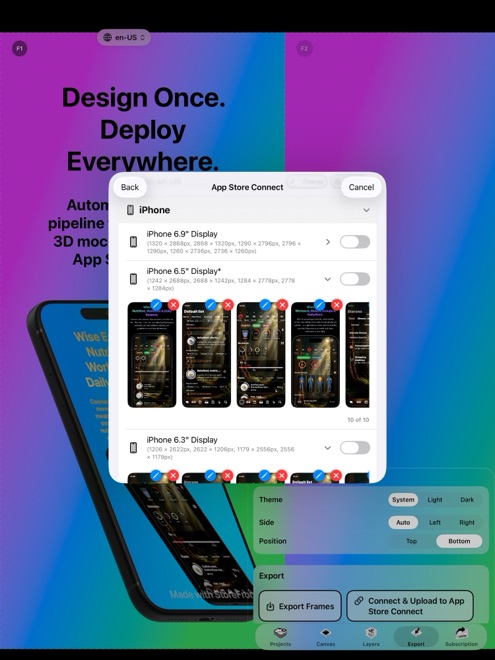
StoreFront Studio combines on-canvas AI storefront translation, multi-size layout adaptation, and direct API upload in one loop.
- Finalize your English screenshot sequence, 3D device angles, and typography hierarchy first so you only translate finished copy.
- Use StoreFront Studio's built-in AI copywriter to translate and culturally adapt headlines for each target storefront.
- Scan every language across your 6.9-inch iPhone and 13-inch iPad sizes to fix awkward line wraps or per-word gradient highlights.
- Push every localized screenshot set across all device sizes to App Store Connect in a single API upload.
Re-check per-word color and gradient emphasis after translation
When you highlight a key verb in English with a per-word gradient, word order changes in other languages. In German or Japanese, the verb often moves to the end of the clause, so double-check that emphasis still lands on the meaningful word rather than a preposition.
A quick five-minute visual pass per language catches orphaned single words, clipped accents on uppercase letters, and mismatched currency or date formats inside sample data.
Keep localized sets in sync when shipping feature updates
Localization pays off most when non-English storefronts stay current across future releases rather than freezing on version 1.0 UI. Keeping every language inside one StoreFront Studio project means adding a new feature slide updates your whole storefront matrix together.
Translate the single new headline, verify its line wraps on phone and tablet sizes, and push the refreshed set across every active territory in one pass.
Can StoreFront Studio translate headlines without leaving the editor?
Yes. The built-in AI copywriter translates and adapts screenshot headlines per storefront directly on the canvas.
Do I have to upload each language separately in App Store Connect?
No. StoreFront Studio's App Store Connect API integration uploads all configured languages and device sizes in one bulk operation.
Why do German and French screenshot headlines clip more often?
Romance and Germanic translations frequently run 20% to 35% longer than concise English imperatives, so leave breathing room in your master text box.