StoreFront Studio vs Fastlane Frameit & Deliver: visual 3D studio vs Ruby CLI pipelines
Fastlane snapshot, frameit, and deliver shine when an engineering team wants git-committed, headless CI screenshots rebuilt automatically on every commit. For most indie developers and studios, however, debugging Ruby gems, ImageMagick font metrics, missing latest-generation frameit PNG offsets, and brittle Framefile.json configs takes far longer than staging real 3D screenshots visually in StoreFront Studio and pushing via the same official App Store Connect API.
1. Interactive RealityKit 3D & rich typography vs ImageMagick Framefile.json
Fastlane frameit composites flat 2D Apple bezel PNGs over raw captures using ImageMagick and JSON keyword/title files. You cannot angle a phone in 3D space, tune specular studio lighting, apply radial backdrop glows, or style a single focal word with a multi-stop gradient without writing custom image-generation scripts outside Fastlane.
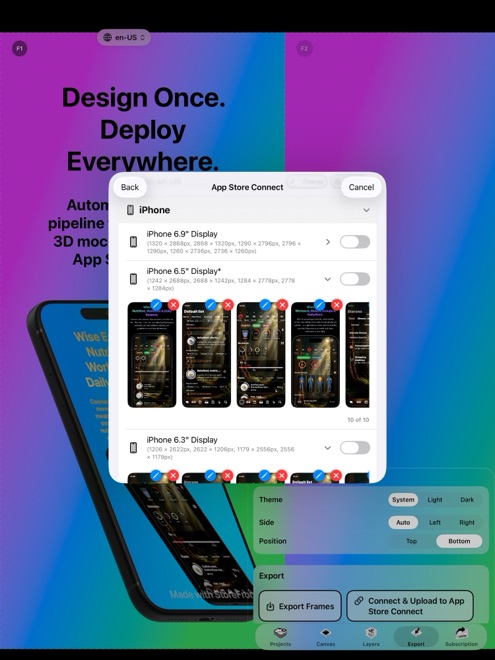
StoreFront Studio gives you a real-time WYSIWYG 3D stage powered by RealityKit alongside a desktop-grade headline engine — so you see exact line wraps, per-word gradients, and 3D lighting across 6.9-inch iPhone and 13-inch iPad canvases immediately.
| Capability | StoreFront Studio | Fastlane frameit + deliver |
|---|---|---|
| Device framing engine | Live RealityKit 3D models with rotation, materials, light & DOF | Flat 2D PNG overlays composited via ImageMagick CLI |
| New Apple hardware readiness | Exact 3D frames across iPhone & iPad generations in-app | Often waits on community PRs for new bezel offset JSON |
| Headline & gradient styling | Interactive fonts, weights, borders & per-word inline gradients | Plain single-style text strings via title.strings + JSON |
| Visual layout preview | Instant live multi-size canvas on Mac, iPad & iPhone | Edit JSON, re-run CLI, inspect output PNGs in Finder |
| AI headline & locale drafting | Built-in App Store-aware AI copywriter on canvas | None built in (bring external string translation scripts) |
2. Local Keychain API upload without Ruby & Bundler maintenance
Developers love Fastlane deliver because it pushes localized screenshots directly to App Store Connect using a local .p8 API key instead of Safari drag-and-drop. StoreFront Studio gives you that exact same superpower — local Keychain storage of your Issuer ID, Key ID, and .p8 file with direct TLS uploads to Apple’s official API — minus Bundler, Homebrew ImageMagick upgrades, or broken Xcode command-line gem paths.
You can even combine Fastlane snapshot (to capture raw localized UI screens from Xcode UI Tests) with StoreFront Studio (to wrap them in lit 3D hardware and push the finished sets to App Store Connect).
| Operational factor | StoreFront Studio | Fastlane frameit + deliver |
|---|---|---|
| Setup time to first upload | Minutes: install from App Store, add .p8 key, upload | Hours: Ruby/Bundler, ImageMagick, Framefile, strings files |
| App Store Connect auth | Official .p8 API key stored in local Apple Keychain | Official .p8 API key or Apple ID session on build machine |
| Non-engineer friendly | Yes — marketers & designers can ship updates from Mac or iPad | No — requires terminal fluency & git access |
| Headless GitHub Actions CI run | Interactive GUI app (not a headless Linux/macOS CLI) | Built specifically for headless CI/CD pipelines |
3. Engineering hours vs a $49.99 one-time tool
Fastlane is free open-source MIT software, which makes its sticker price $0. Yet spending four hours every autumn fixing broken ImageMagick text clipping on German strings easily costs more in developer focus than a $49.99 lifetime purchase (or $3.99 for a launch month).
Use Fastlane deliver for automated TestFlight builds and text release notes, and reach for StoreFront Studio whenever visual polish and 3D presentation drive conversion.
| Team workflow | Best choice | Why |
|---|---|---|
| High-converting 3D hero angles & gradient headlines | StoreFront Studio | frameit only stamps flat 2D frames and plain text |
| Solo dev wanting fast multi-locale API uploads without Ruby | StoreFront Studio | Same official ASC API push with zero CLI maintenance |
| Nightly automated CI rebuild of 30 locales from UI tests | Fastlane snapshot + deliver | Scriptable from git commits without opening a GUI |
| Hybrid workflow (UI test captures + 3D store polish) | Both together | Capture raw screens via XCTest, stage in 3D & upload in StoreFront Studio |
Does StoreFront Studio use the same official App Store Connect API as Fastlane deliver?
Yes. Both authenticate using Apple’s official App Store Connect API key (Issuer ID, Key ID, and .p8 private key) over TLS directly to Apple.
Can I import raw screenshots captured by Fastlane snapshot into StoreFront Studio?
Yes. Clean simulator captures from snapshot or Xcode Simulator drop straight onto StoreFront Studio’s RealityKit 3D iPhone and iPad models.
Why do developers replace Fastlane frameit for App Store screenshots?
frameit relies on flat 2D bezels, ImageMagick text rendering quirks, and manual JSON coordinates, making 3D angles and modern per-word gradient headlines impractical.
Does StoreFront Studio require installing Homebrew, Ruby, or Python?
No. It is a self-contained native app from the App Store for macOS, iPadOS, and iOS 26.