StoreFront Studio vs Rotato: full multi-locale App Store sets & ASC upload vs Mac 3D mockups
Rotato is well loved on macOS when you need animated 3D camera flythrough videos for social teasers or landing pages. When your goal is shipping complete, multi-size, multi-language static App Store screenshot sets straight to App Store Connect — across Mac, iPad, and iPhone — StoreFront Studio handles the typography, responsive Apple dimensions, AI localization, and direct API upload that single-scene 3D mockup apps leave to external tools.
1. End-to-end App Store screenshot studio vs single-scene 3D mockup renderer
Rotato excels at rendering a single 3D device scene or keyframed MP4 promo animation on a Mac, after which many developers still export transparent PNGs into Figma or Sketch to write gradient headlines, align ten-slide sequences, and resize for 13-inch iPad.
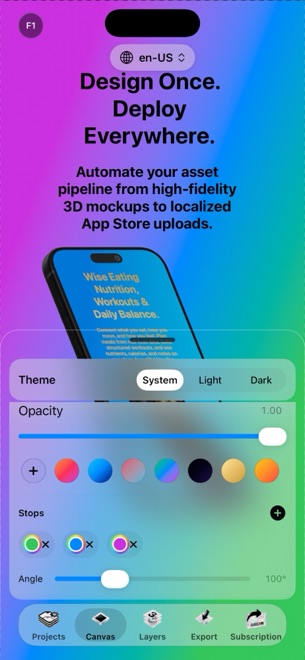
StoreFront Studio puts both the RealityKit 3D stage and the complete App Store layout engine in one canvas: rotate and light 3D iPhones and iPads, toggle real materials and depth of field, write multi-color gradient headlines above them, and adapt one design across every required Apple resolution.
| Feature | StoreFront Studio | Rotato |
|---|---|---|
| 3D still hardware rendering | Native RealityKit 3D iPhone & iPad models, studio light, materials & DOF | Real-time 3D device renderer on macOS |
| Animated 3D MP4 video exports | Not included (focused on static App Store screenshot sets) | Core strength: keyframed 3D promo videos & App Previews |
| Headline & inline gradient engine | Full desktop typography + per-word colors & gradients built in | Basic scene text; complex multi-slide copy usually finished in Figma |
| Multi-size App Store scaling | One canvas adapts across 6.9", 6.5", 13" iPad & older slots | Per-scene aspect ratio; manual multi-device rework |
| Supported Apple platforms | Mac, iPad & iPhone (iOS 26+) | macOS only |
2. Localization & direct App Store Connect upload
Exporting ten 3D stills on Mac is quick for a US-only launch, but scaling to ten languages across iPhone and iPad means rendering two hundred individual stills and dragging them into Safari folder by folder.
StoreFront Studio integrates AI storefront headline adaptation and an official App Store Connect API bulk uploader (using your local Keychain .p8 key), turning multi-locale screenshot publishing into a single operation from Mac, iPad, or iPhone.
| Release workflow step | StoreFront Studio | Rotato |
|---|---|---|
| On-canvas storefront translation | Built-in AI copywriter writes & adapts per storefront | Manual string replacement per scene |
| Direct App Store Connect upload | Yes — bulk upload of all sizes & languages via Keychain API key | No — exports local image/video files for manual upload |
| Editing away from your Mac | Full native app on iPadOS & iOS 26 | Requires macOS machine |
| Account requirement | No account or login required | License activation on Mac |
3. Pricing and how developers decide between them
If your top priority is a 15-second 3D orbiting MP4 for Product Hunt or X, Rotato is built for motion. If your priority is converting App Store search traffic with crisp 3D-framed screenshots across every required Apple size and language without touching Figma or Safari upload slots, StoreFront Studio covers the entire workflow for $3.99/mo, $39.99/yr, or $49.99 once forever.
Because StoreFront Studio’s full 3D editor is free to try with no account, you can stage a complete storefront in under an hour before deciding.
| Goal | Recommended tool | Why |
|---|---|---|
| Complete 3D App Store screenshot sets + bulk ASC push | StoreFront Studio | Combines RealityKit 3D, gradient headlines, sizing & API upload |
| Keyframed 3D promo videos & social motion clips | Rotato | Purpose-built timeline camera animation & MP4 output |
| Designing on iPad Pro or iPhone as well as Mac | StoreFront Studio | Universal Apple experience with one $49.99 lifetime Pro unlock |
Does StoreFront Studio export animated 3D videos like Rotato?
No. StoreFront Studio focuses strictly on static 3D-rendered App Store screenshots, multi-size adaptation, localization, and direct App Store Connect uploads.
Are StoreFront Studio’s iPhone and iPad frames real 3D or flat layers?
They are real 3D models rendered with Apple’s RealityKit engine, complete with 3D rotation, scale, physical materials, studio lighting, and depth of field.
Do I still need Figma to add text above 3D mockups in StoreFront Studio?
No. StoreFront Studio includes a full headline engine with custom fonts, weights, borders, background gradients, and per-word inline gradients.
Can I buy StoreFront Studio once instead of paying a yearly subscription?
Yes. StoreFront Studio Pro is available as a $49.99 one-time lifetime purchase alongside $3.99/month and $39.99/year options.