StoreFront Studio vs Picasso App Screenshots: RealityKit 3D, iPad/iPhone support & pricing
Native Apple screenshot apps like Picasso proved developers prefer fast native workflows with App Store Connect uploads over bloated web SaaS tools. StoreFront Studio pushes the native Apple approach further with true RealityKit 3D iPhone and iPad models (studio lighting, materials, and depth of field), native support across iPhone, iPad, and Mac, inline per-word gradients, and a $49.99 one-time lifetime Pro option.
1. True RealityKit 3D stage vs 2D/preset device framing
When comparing native Apple screenshot builders, inspect whether device mockups are flat 2D overlays or real 3D geometry. Flat overlays keep screens front-facing, which works for plain utility cards, but cannot catch studio rim light on a dark bezel or angle slide one in 3D space.
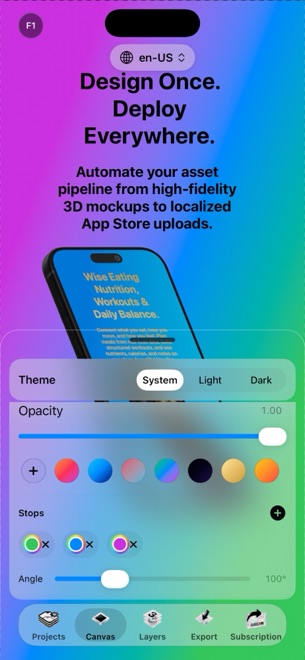
StoreFront Studio renders iPhone and iPad generations in 3D using RealityKit. You rotate, scale, and place hardware freely, switch physically accurate materials on or off, adjust studio lighting and depth of field, and pair them with per-word inline gradient headlines.
| Capability | StoreFront Studio | Picasso (Native Screenshot Tool) |
|---|---|---|
| 3D hardware rendering | Live RealityKit 3D iPhone & iPad models, studio light & DOF | Primarily 2D framed layouts & template compositions |
| Supported Apple devices | iPhone (iOS 26+), iPad & Mac | Apple ecosystem app (check platform requirements per build) |
| Per-word inline gradients | Single-sentence per-word colors & multi-stop linear/radial gradients | Layer & caption styling controls |
| Multi-size Apple layout | One canvas adapts across 6.9", 6.5", 13" iPad & older sizes | Multi-device Apple screenshot sizing |
| Account requirement | No account signup; local project storage | Native Apple workflow |
2. AI copywriting, localization & Keychain App Store Connect upload
Both workflows embrace Apple’s official App Store Connect API so developers can push localized screenshots straight to an editable app version instead of dragging files into Safari. In StoreFront Studio, your Issuer ID, Key ID, and .p8 private key stay strictly inside your local device Keychain and connect directly to Apple over TLS.
StoreFront Studio also embeds an AI copywriter tuned to App Store marketing guidelines right on the canvas — letting you generate benefit-led headlines and adapt them per storefront before triggering one bulk upload.
| Workflow check | StoreFront Studio | Picasso |
|---|---|---|
| App Store Connect API push | Bulk upload across all sizes & languages in Free & Pro | Direct App Store Connect upload support |
| Credential storage | Local device Keychain only; never sent to Arte Soft | Local Apple credential workflow |
| AI headline generation | Built-in App Store guideline-aware AI copywriter + translator | Localization & template text tools |
| Try full uploader before paying | Yes (free export carries watermark until Pro) | Check free-tier project/upload limits |
3. Free-tier generosity and $49.99 lifetime Pro
Nothing is worse than hitting a hard paywall halfway through laying out slide four before seeing whether an app handles your iPad aspect ratio well. StoreFront Studio holds zero features back in the editor: 3D models, gradients, AI copy, multi-size scaling, and ASC upload all run in Free (with AdMob ads, a rewarded ad before export, and a small watermark).
Removing ads and watermarks costs $3.99/month, $39.99/year, or $49.99 once forever — restoring across your Mac, iPad, and iPhone through your Apple ID.
| Factor | StoreFront Studio | Why it matters |
|---|---|---|
| Free tier editor access | 100% of 3D, text, AI & upload tools unlocked | Verify real pixel outputs & ASC connection risk-free |
| Monthly launch pass | $3.99/month | Lowest friction for a single app update sprint |
| Annual / Lifetime Pro | $39.99/year or $49.99 one-time purchase | Predictable zero-renewal option for indie portfolios |
| Standout differentiator | RealityKit 3D lighting + inline per-word gradients on iOS/iPad/Mac | Delivers studio-lit 3D polish without external 3D apps |
What separates StoreFront Studio from 2D native screenshot apps?
StoreFront Studio renders real 3D iPhone and iPad models via Apple’s RealityKit with adjustable rotation, studio lighting, physical materials, and depth of field.
Can I design screenshots on my iPad or iPhone and also use my Mac?
Yes. StoreFront Studio ships for iOS 26, iPadOS, and macOS, and Pro purchases restore across all devices signed into your Apple ID.
Does StoreFront Studio lock App Store Connect uploads behind an annual tier?
No. Even the free version includes App Store Connect upload (with a watermarked output), and clean watermark-free Pro starts at $3.99/month or $49.99 once.
Where does StoreFront Studio keep my projects and .p8 key?
Projects stay locally on your device, and your App Store Connect .p8 key stays inside your local Apple Keychain.