Lifetime App Screenshot Tool ($49.99) vs Monthly ASO Screenshot Subscriptions: 3-Year Cost Math
App Store screenshot design is spiky work: you push hard before v1.0, refresh visuals for major OS releases, and go weeks between screenshot edits while writing Swift code. Paying $29 to $79 every month for a browser screenshot SaaS drains $1,000+ over three years, whereas StoreFront Studio offers both a $3.99 launch-month option and a $49.99 one-time lifetime Pro unlock.
1. Why cloud screenshot SaaS costs so much more than native Apple software
Web-based screenshot generators run server-side headless browsers or cloud GPU queues to render exports, host gigabytes of customer PNGs in cloud buckets, and maintain multi-seat web billing — passing those recurring server bills straight to you every month.
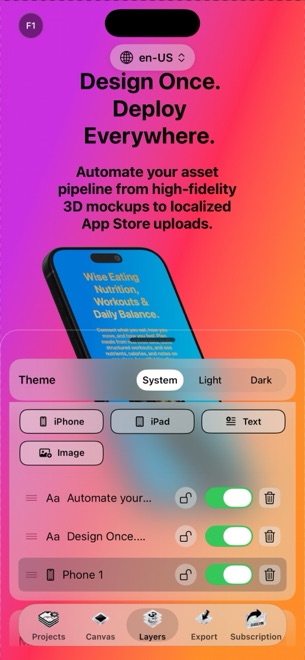
StoreFront Studio runs natively on the Apple Silicon Mac, iPad, or iPhone you already own. RealityKit renders 3D models on your local GPU, projects live on your local storage, and your App Store Connect .p8 key lives in your local Keychain — keeping marginal server cost near zero so a $49.99 lifetime license makes complete economic sense.
| Pricing path | Year 1 total | Year 2 cumulative | Year 3 cumulative |
|---|---|---|---|
| StoreFront Studio Free tier | $0 (ads + watermark) | $0 | $0 |
| StoreFront Studio Pro (2 launch months/yr @ $3.99) | $7.98 | $15.96 | $23.94 |
| StoreFront Studio Pro Yearly ($39.99/yr) | $39.99 | $79.98 | $119.97 |
| StoreFront Studio Pro Lifetime ($49.99 once) | $49.99 | $49.99 | $49.99 |
| Typical mid-tier web screenshot SaaS (~$29/mo) | $348.00 | $696.00 | $1,044.00 |
| Multi-locale / API web SaaS tier (~$69/mo) | $828.00 | $1,656.00 | $2,484.00 |
2. Avoiding the "cancel and lose my editable templates" trap
Some developers plan to subscribe to a $39/month web generator for one week and cancel — only to discover six months later that their project exceeds free-tier app or language limits, locking edits until they pay another full billing cycle.
In StoreFront Studio, every project file stays locally on your device, and 100% of the editor works even on the Free tier. Better still, buying the $49.99 Lifetime Pro In-App Purchase once means every future bug-fix screenshot swap across five apps and twenty languages costs $0 forever.
| Policy | StoreFront Studio Pro | Typical Monthly Web SaaS |
|---|---|---|
| Number of apps supported | Unlimited local app projects | Often capped at 1–5 apps on entry tiers |
| Number of localized storefronts | Unlimited locales + bulk ASC API upload | Often metered by locale count or translation credits |
| Cross-device Apple ID restore | Restores across your Mac, iPad & iPhone | Tied to web login seat |
| Billing & cancellation control | Standard Apple Settings → Subscriptions (or never-renewing Lifetime) | Vendor billing portal |
3. Choosing between $3.99/mo, $39.99/yr, and $49.99 Lifetime inside StoreFront Studio
All three StoreFront Studio Pro tiers unlock the exact same three things: zero AdMob ads, zero export watermark, and instant exports without a rewarded ad beforehand.
Start in Free with no account to design your entire 3D set. Pick $3.99/month if you are shipping a one-off project this weekend, or grab the $49.99 Lifetime option if you plan to maintain your app for more than thirteen months.
| Your situation | Recommended tier | Break-even math |
|---|---|---|
| Testing 3D models, gradients & layout fit | Free ($0) | Full editor unlocked; watermark on test exports |
| Single hackathon or client handoff this month | Pro Monthly ($3.99) | Less than a cup of coffee; cancel anytime |
| Active indie developer or multi-app studio | Pro Lifetime ($49.99 once) | Cheaper than 13 months of Monthly or 15 months of Yearly |
Does StoreFront Studio Lifetime Pro really never renew?
Correct. Pro, forever ($49.99) is a one-time Apple In-App Purchase (`StoreFront.Studio.Pro.Lifetime`) that never renews and restores across your Apple ID devices.
Are any features held back from Monthly Pro compared to Lifetime Pro?
None at all. Monthly ($3.99), Yearly ($39.99), and Lifetime ($49.99) unlock identical clean, ad-free, instant exports and uploads.
How are subscriptions managed or refunded?
All purchases go through Apple’s App Store: manage or cancel in Settings → your name → Subscriptions, and request refunds via reportaproblem.apple.com.
Why does the free version show ads instead of locking 3D devices?
Keeping the entire 3D editor, AI copywriter, and uploader open lets you build and verify your real screenshots before deciding to buy Pro.