Designing App Store Screenshots on iPad & iPhone vs Mac-Only Desktop Workflows
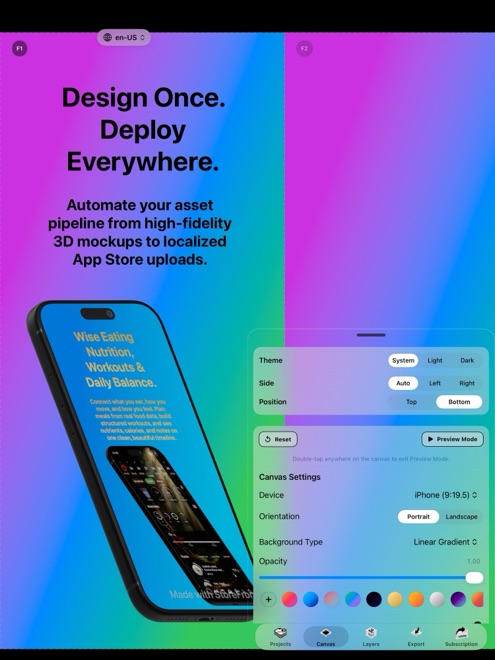
Mac-only mockup apps and desktop-only web dashboards chain every minor screenshot tweak to your desk. Because StoreFront Studio ships as one native app across iOS 26, iPadOS, and macOS, you get wide-monitor keyboard precision beside Xcode on Mac AND the freedom to capture real on-device screens, stage 3D layouts, translate headlines, and push to App Store Connect straight from an iPad or iPhone.
1. Where Mac shines vs where iPad and iPhone win
Sitting at a Mac with Xcode Simulator open makes capturing ten clean resolution states and typing headlines fast. Yet many apps — camera tools, ARKit utilities, PencilKit sketchpads, Bluetooth hardware companions, and Swift Playgrounds iPad apps — must be captured on physical iPhones and iPads.
Instead of AirDropping captures back and forth to a desktop browser, running StoreFront Studio natively on your iPad or iPhone lets you pull straight from Photos (only when you choose), stage RealityKit 3D models by touch, and upload directly to App Store Connect.
| Device | Primary advantage in StoreFront Studio | Typical use case |
|---|---|---|
| Mac (macOS) | Large display + hardware keyboard right beside Xcode Simulator | Full 10-slide, multi-locale release builds |
| iPad (iPadOS) | Spacious touch canvas; ideal for Swift Playgrounds & Pencil apps | Designing & uploading away from desk or on iPad-first builds |
| iPhone (iOS 26+) | See search-thumbnail legibility at true 1:1 physical phone scale | Fast headline updates, marketers & real-hardware captures |
2. Feature parity vs watered-down companion apps
Most graphic platforms treat iOS and iPadOS as stripped-down viewer apps that omit 3D rendering or export pipelines. StoreFront Studio runs the exact same core engine everywhere: RealityKit 3D iPhone and iPad models, studio lighting, per-word inline gradients, multi-size layout adaptation, AI copywriting, and Keychain-backed App Store Connect bulk uploads.
And because Pro is tied to your Apple ID, a single purchase unlocks clean ad-free exports across your Mac, iPad, and iPhone with no extra device-seat charges.
| Capability | StoreFront Studio (iPhone, iPad, Mac) | Mac-Only Apps | Browser Web Generators |
|---|---|---|---|
| RealityKit 3D rendering | Native on all 3 Apple platforms | macOS only | Clunky or unsupported on mobile Safari |
| Direct App Store Connect API push | Works on iPhone, iPad & Mac via Keychain | macOS only | Desktop browser oriented |
| Judge real iPhone search legibility | Instant native preview in hand on iPhone | Must AirDrop test PNGs to phone | Must download & send to phone |
| License coverage | 1 Apple IAP restores on your Apple devices | Mac license only | Account login |
3. Practical tips for mobile and tablet release updates
Marketers and indie founders frequently spot a seasonal angle or urgent metadata fix while traveling with only an iPad or iPhone. Importing your App Store Connect Issuer ID, Key ID, and `.p8` file into the local Keychain on your iPad lets you ship localized visual updates without opening a laptop.
Remember that photo library permission is optional and requested only when you pick a screenshot from Photos — keeping privacy tight on personal devices.
| Scenario | Best screen to open | Why |
|---|---|---|
| Auditing 15 languages across 6.9" + 13" iPad | Mac or 13" iPad | Extra screen width speeds side-by-side line-wrap checks |
| Shipping an app built in Swift Playgrounds on iPad | iPad | Zero Mac required from code to App Store Connect |
| Quick headline variant or copy tweak on the road | iPhone or iPad | Full uploader & AI copywriter right in your pocket |
Is the iPhone or iPad version of StoreFront Studio missing Mac features?
No. The 3D stage, text and gradient engine, AI copywriter, multi-size canvas, and App Store Connect uploader all work across iOS 26, iPadOS, and macOS.
Do I have to buy StoreFront Studio Pro separately on Mac and iOS?
No. StoreFront Studio Pro is an Apple In-App Purchase that restores across the iPhone, iPad, and Mac devices signed into your Apple ID.
Can I upload screenshots to App Store Connect directly from an iPad?
Yes. Add your Issuer ID, Key ID, and .p8 file to your iPad’s Keychain in StoreFront Studio and push localized sets over TLS directly to Apple.
What minimum OS version is required?
StoreFront Studio requires iOS 26 or later on iPhone (plus compatible iPadOS and macOS releases).