Designing App Store Screenshots Without Figma
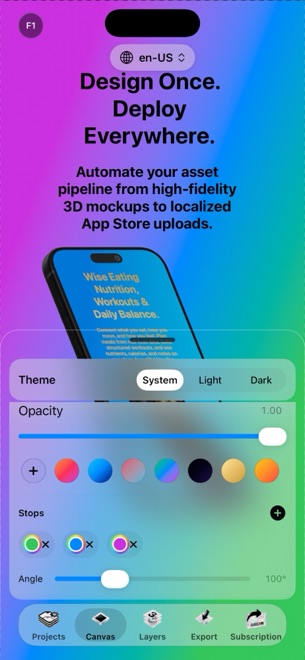
Shipping an indie app should not require wiring together Blender for 3D device frames, Figma for typography, Python scripts for resizing, and Fastlane just to upload screenshots. General-purpose design tools are built for open-ended UI wireframing, not the repetitive multi-size matrix App Store Connect demands. StoreFront Studio puts the 3D stage, headline engine, and store uploader inside one native Apple app.
Where general design tools slow down release day
Vector canvases handle flat rectangles effortlessly, yet the moment you want an angled iPhone with realistic studio lighting, you end up hunting for massive third-party mockup PSDs that go outdated every September when Apple releases new hardware.
Worse, duplicating eighty artboards across sizes and languages means a single gradient tweak or font change turns into an afternoon of manual slice-and-export housekeeping.
- No hunting for third-party PSD or PNG device bezel packs.
- No manual artboard duplication for 6.9-inch, 6.5-inch, and 13-inch iPad outputs.
- No exporting hundreds of folders just to drag files into Safari.
Go from Xcode Simulator to App Store Connect in one hour
Running StoreFront Studio natively on macOS puts it right beside Xcode Simulator, with full keyboard and large-monitor space for reviewing ten-slide sets. Prefer working away from your desk? The exact same app runs on iPhone (iOS 26) and iPadOS.
You do not even need to create an account to open the editor and stage your entire screenshot set.
- Press Command-S in Xcode Simulator (or capture on your physical iPhone and iPad) to save five to eight crisp UI screens.
- Drop those captures onto RealityKit 3D device models in StoreFront Studio and set lighting, materials, and subtle angles.
- Write short headlines above each device using per-word colors or gradients — or draft options with the built-in AI copywriter.
- Review every required output size, localize target storefronts if needed, and push straight to App Store Connect via your Keychain API key.
Test the complete workflow free before paying a cent
Many screenshot web tools lock 3D devices, localization, or store upload behind forty-dollar monthly tiers before you even know whether you like their layouts. StoreFront Studio unlocks the entire 3D editor, rich text engine, AI copywriter, and App Store Connect upload in the free tier.
Free exports play a short rewarded ad first and include a small watermark, so you can build, test, and inspect real pixel outputs with zero upfront risk.
Choose Pro only when you are ready to ship clean
When your screenshots are ready for live customers, upgrading to StoreFront Studio Pro changes exactly three things: ads disappear, the watermark disappears, and exports run immediately with no rewarded ad beforehand.
Pro is an Apple In-App Purchase tied to your Apple ID — $3.99 a month for a quick launch sprint, $39.99 a year, or $49.99 once forever — with nothing to sign up for outside the App Store.
Does StoreFront Studio run natively on Mac as well as iPhone and iPad?
Yes. StoreFront Studio runs across macOS, iPadOS, and iOS 26, tied to the same Apple ID for Pro restores.
What is the difference between StoreFront Studio Free and Pro?
Every editor, 3D, AI, and upload tool is in Free; Pro ($3.99/mo, $39.99/yr, or $49.99 lifetime) removes ads, removes the export watermark, and exports immediately.
Do I need to create a StoreFront Studio account?
No. There is no account or login; projects stay local on your device and Pro uses standard Apple In-App Purchase.