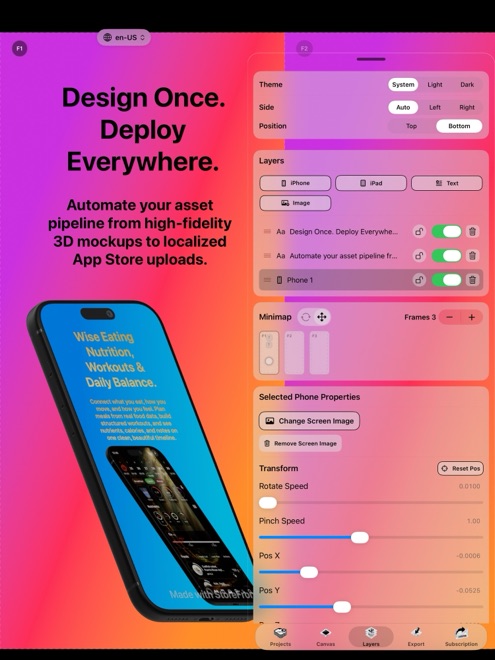
StoreFront Studio vs Appure & Hotpot.ai: native Apple 3D & lifetime Pro vs web credit packs
Browser utilities like Appure and Hotpot.ai attract developers searching for quick free online screenshot templates, though teams often run into dated 2D frames, per-graphic AI credit meters, and manual ZIP uploads. StoreFront Studio delivers a clean native iPhone, iPad, and Mac app with live RealityKit 3D models, direct App Store Connect API publishing, transparent Free-vs-Pro rules, and a $49.99 lifetime unlock.
1. Modern RealityKit 3D craft vs generic web template builders
General online graphic portals bundle dozens of unrelated AI and social tools alongside basic 2D app screenshot frames. Because those canvases run in web tabs with static frames, layouts often feel dated compared to modern App Store category leaders.
StoreFront Studio focuses 100% on Apple App Store screenshots: real 3D iPhone and iPad models rendered with RealityKit, adjustable studio light and depth of field, multi-stop radial and linear gradients, and inline per-word gradient headlines.
| Dimension | StoreFront Studio | Appure / Hotpot.ai |
|---|---|---|
| Product focus | Dedicated Apple App Store 3D screenshot studio | Browser template generator / multi-tool graphic site |
| 3D hardware & lighting | Interactive RealityKit 3D models, materials, studio light & DOF | Primarily flat 2D frames & static web templates |
| Inline typography control | Per-word colors & gradients inside one sentence, borders & radii | Basic browser text overlays |
| Apple multi-size adaptation | One canvas adapts across 6.9", 6.5", 13" iPad & legacy slots | Manual template selection or per-size exports |
| Google Play / Android templates | Not included (Apple App Store only) | Available on web templates |
2. Direct App Store Connect API push vs manual file downloads
Exporting PNGs from Appure or Hotpot.ai still leaves the slowest step — uploading every screen size and language into App Store Connect — completely manual.
StoreFront Studio combines an on-canvas AI copywriter (for App Store-compliant headlines and storefront translations) with an official App Store Connect bulk uploader whose .p8 API key stays safely inside your local Apple Keychain.
| Check | StoreFront Studio | Appure / Hotpot.ai |
|---|---|---|
| App Store Connect API upload | Built in — bulk-pushes all sizes & languages over TLS | Not included — manual ZIP download & Safari upload |
| Where projects & keys stay | Locally on your iPhone, iPad, or Mac + local Keychain | Browser / cloud servers |
| Account signup required | None — zero login to use editor | Account required for saved projects / paid plans |
| AI headline copywriting | Included on canvas (sends only text you explicitly prompt) | Separate credit-metered AI tools or manual copy |
3. Clear Free-vs-Pro honesty without credit math
StoreFront Studio states its Free tier rules plainly up front: 100% of the 3D editor, text engine, AI copywriter, and ASC uploader work for free, while the free app shows AdMob ads and each free export plays a short rewarded ad and adds a small watermark.
Buying Pro ($3.99/month, $39.99/year, or $49.99 once forever) removes the ads, removes the watermark, and exports immediately — with zero credit packs to replenish.
| Pricing element | StoreFront Studio | Web Credit / Subscription Portals |
|---|---|---|
| What Free holds back in editor | Nothing — all 3D, text, AI & upload tools work | Often locks HD sizes, templates, or commercial rights |
| Paid structure | Flat Apple IAP: $3.99/mo, $39.99/yr, or $49.99 lifetime | Monthly subscriptions or consumable credit packs |
| Unlimited exports on Pro | Yes — local rendering costs zero credits | Often metered per credit or tier |
What is the exact difference between StoreFront Studio Free and Pro?
Everything in the editor works in Free (with occasional AdMob ads, a rewarded ad before export, and a small watermark). Pro removes the ads, removes the watermark, and exports immediately.
Does StoreFront Studio charge credits when using the AI copywriter or exporting 3D?
No. There are no consumable credit packs in StoreFront Studio.
Can I upload directly to App Store Connect instead of downloading ZIPs?
Yes. Add your official App Store Connect API key to your local Keychain and push all sizes and languages straight from the app.
Which platforms run StoreFront Studio?
iPhone (iOS 26+), iPad, and Mac via the App Store.