StoreFront Studio vs AppLaunchpad: RealityKit 3D & direct ASC upload vs browser mockups
AppLaunchpad is a straightforward browser mockup builder when you want quick drag-and-drop templates covering both Android phones and iPhones without installing software. StoreFront Studio goes much further for Apple developers: it renders true RealityKit 3D iPhone and iPad models natively on iPhone, iPad, and Mac, styles inline per-word gradients, and bulk-uploads every size and locale directly to App Store Connect.
1. Real 3D RealityKit staging vs static browser mockup layers
Browser template tools like AppLaunchpad rely primarily on pre-rendered device frames and fixed perspective cutouts. That works fine when you want a standard front-facing frame, but you cannot freely orbit the camera, change how studio light catches a titanium edge, or toggle physical materials on and off.
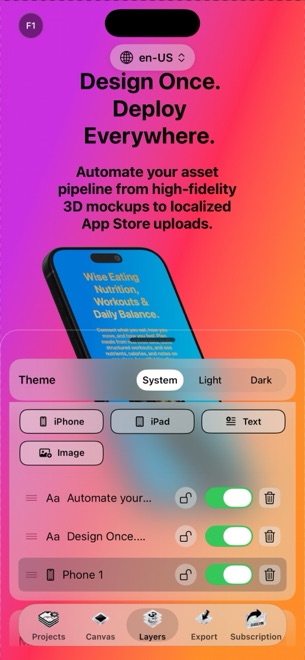
StoreFront Studio runs a real-time 3D RealityKit stage natively on Apple silicon and iOS 26. Every iPhone and iPad generation has an exact 3D frame you can rotate, scale, position, light, and pair with subtle depth of field.
| Feature | StoreFront Studio | AppLaunchpad |
|---|---|---|
| Device frame technology | Real-time RealityKit 3D models with adjustable light & materials | Pre-rendered 2D/3D mockup templates in web browser |
| Camera & angle freedom | Continuous 3D rotation, scale, position & depth of field | Fixed angles dictated by chosen template |
| Single-sentence word highlights | Different colors or linear/radial gradients on individual words | Uniform text-box fills or separate stacked text layers |
| Supported screenshot ecosystems | Apple App Store (iPhone & iPad required dimensions) | Apple App Store + Google Play Android devices |
| Works offline without browser lag | Yes — native macOS, iPadOS & iOS 26 app | No — requires live web session |
2. Release-day publishing: direct API push vs ZIP folder downloads
Finishing your design in a browser mockup generator is only half the chore if you still have to download a massive ZIP archive, unzip folders per resolution, open App Store Connect in Safari, and drag ten screenshots into every localized slot manually.
StoreFront Studio closes that loop inside the same screen. Add your official App Store Connect API key once (stored in your local device Keychain), translate headlines per storefront with the built-in AI copywriter, and push every required iPhone and iPad size across all active languages in one operation.
| Release step | StoreFront Studio | AppLaunchpad |
|---|---|---|
| Adapting phone to 13" iPad & legacy sizes | One canvas adapts automatically for quick visual review | Clone/resize designs across separate device tabs |
| On-canvas AI copy & translation | Built-in AI copywriter tuned to App Store marketing rules | Clone & translate features on paid web plans |
| Delivery to App Store Connect | Direct bulk API upload from app via local Keychain key | Download PNG/JPG ZIP files and upload manually in browser |
| Account & cloud storage | No account required; files remain on your device | Account login required; projects saved in cloud |
| PNG alpha-channel compliance | Exports flattened opaque App Store-ready images | Manual export verification per template |
3. Pricing comparison for solo developers and small studios
Paying $15 to $29 per month for a web mockup subscription adds up fast when you maintain multiple utility apps over several years. StoreFront Studio lets you test the entire 3D workflow, AI copywriter, and uploader for free (with AdMob ads and a watermarked export after a rewarded ad).
When you are ready to ship clean production assets, StoreFront Studio Pro is $3.99/month, $39.99/year, or $49.99 once for life — with no recurring bill ever again.
| Decision factor | StoreFront Studio | AppLaunchpad |
|---|---|---|
| Entry paid monthly price | $3.99/month (Apple IAP) | Higher monthly web subscription |
| One-time lifetime purchase | $49.99 once forever (restores across your Apple devices) | Not offered (subscription model) |
| Choose when shipping iOS/iPadOS/macOS apps | Recommended for 3D depth + one-click ASC API upload | Leaves you doing manual ZIP downloads & Safari uploads |
| Choose when shipping Android + Windows | Not designed for non-Apple hardware | Recommended if working from Windows/Linux for Play Store |
Does AppLaunchpad upload directly to App Store Connect like StoreFront Studio?
Traditional mockup generators export image archives that you drag into Safari manually, whereas StoreFront Studio pushes all sizes and languages directly through Apple’s official App Store Connect API.
Can I try StoreFront Studio without creating an account or entering a card?
Yes. Download StoreFront Studio from the App Store with zero account signup; the full editor is free and supported by ads and an export watermark until you choose Pro.
Does StoreFront Studio run on Mac as well as iPhone and iPad?
Yes. The same native app runs on macOS, iPadOS, and iOS 26 with full keyboard and large-canvas comfort.
What does StoreFront Studio Pro unlock for $49.99 lifetime?
Pro removes AdMob ads, removes the small watermark on exported screenshots, and exports immediately without playing a rewarded ad first.