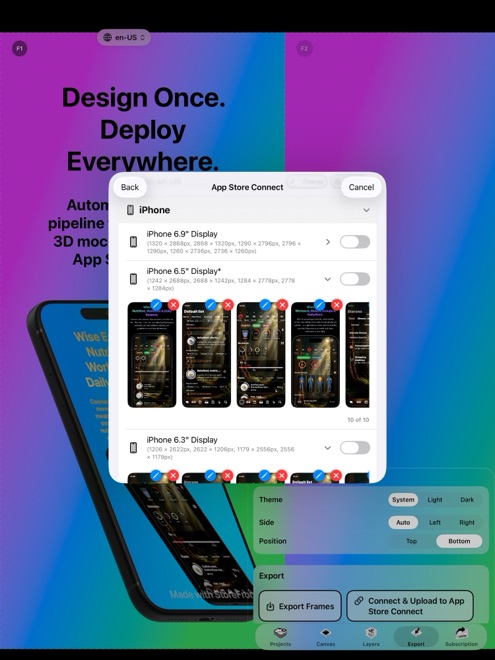
StoreFront Studio API Upload vs Manual App Store Connect Safari Drag-and-Drop
Dragging five screenshots into App Store Connect by hand takes three minutes when you ship one language and one iPhone size. As soon as your app supports iPhone plus 13-inch iPad across ten languages, manual Safari uploads balloon into 100–300 files sorted across twenty browser dropdowns — a repetitive error-prone chore that StoreFront Studio replaces with one official App Store Connect API push.
1. The math of multi-size, multi-language release day
Every localization in App Store Connect has separate media tabs for iPhone and iPad display slots. In Safari, updating eight screenshots across two device families and twelve languages means switching the locale menu twelve times, clearing old images, dragging 192 files in exact slot order, and waiting for browser processing spinners.
Catching a single typo in slide two afterward forces you to repeat that browser dance twelve more times. StoreFront Studio maps every rendered image directly to its exact target locale code, display slot, and sequence index over Apple’s official API in one batch.
| Release scenario | StoreFront Studio Bulk API Push | Manual Safari Drag-and-Drop |
|---|---|---|
| 1 locale, iPhone only (5 slides) | 1 click after designing on 3D canvas | ~3 minutes (manageable manually) |
| 5 locales, iPhone + 13" iPad (80 files) | 1 bulk API operation from Mac, iPad, or iPhone | 25–40 minutes of folder sorting & dropdown switching |
| 15+ locales, iPhone + iPad (240–300+ files) | 1 bulk API operation over TLS | 1–2+ hours; high risk of wrong-language slot mixups |
| Fixing a headline typo across all locales | Edit project, re-translate if needed, re-push once | Re-export, re-sort folders, clear & re-upload every slot |
2. How Keychain API authentication works without Apple ID 2FA prompts
Manual browser sessions expire mid-afternoon and never let you push directly from an iPad or iPhone canvas cleanly. Apple’s official App Store Connect API solves this with scoped team keys (Issuer ID, Key ID, and a downloadable `.p8` file) granted Admin or App Manager access.
StoreFront Studio stores those three values inside your local iOS, iPadOS, or macOS Keychain — never transmitting them to Arte Soft — and communicates strictly with Apple’s API endpoints over encrypted TLS when you start an upload.
| Operational detail | StoreFront Studio API Upload | Manual Safari Browser Upload |
|---|---|---|
| Authentication method | Official App Store Connect .p8 API key in local Keychain | Interactive Apple ID password + 2FA browser session |
| Third-party credential exposure | Zero — direct device-to-Apple TLS connection | Zero — direct browser-to-Apple session |
| Slot order & locale matching | Deterministic programmatic locale + display-type mapping | Human drag order (easy to swap slide 3 & 4 or fr-FR & de-DE) |
| Required App Store Connect state | Editable version (e.g. Prepare for Submission) with locales enabled | Editable version in App Store Connect web UI |
3. Free testing and clean Pro shipping
Even if you only ship two or three updates per quarter, reclaiming an hour on every release — so you actually ship localized screenshots instead of putting them off — compounds quickly across organic downloads.
You can test the App Store Connect uploader in StoreFront Studio’s free tier (watermarked exports) to confirm your key works, then unlock watermark-free, ad-free instant exports with Pro ($3.99/mo, $39.99/yr, or $49.99 lifetime).
| Situation | Recommended path | Why |
|---|---|---|
| Uploading a single App Preview video file | Manual App Store Connect Safari UI | StoreFront Studio focuses on static 3D screenshots |
| Any Universal iPhone + iPad app or 2+ languages | StoreFront Studio API Upload | Eliminates multi-slot folder mistakes and tedious browser waits |
| Shipping screenshot updates from iPad or iPhone | StoreFront Studio API Upload | Avoids desktop Safari file-picker gymnastics on mobile |
Which permissions does my App Store Connect API key need for StoreFront Studio?
Generate a Team Key under Users and Access → Integrations with Admin or App Manager access so Apple’s API allows creating and replacing version screenshot sets.
Does my app version need to be in Prepare for Submission before uploading?
Yes. Apple’s App Store Connect API only accepts new screenshots on an editable version state with your target localizations added.
Can I remove my .p8 API key from StoreFront Studio later?
Yes. You can delete the App Store Connect key from StoreFront Studio’s settings on your device at any time.
Should I still spot-check App Store Connect in Safari before clicking Submit for Review?
A quick 60-second visual check of two locales in App Store Connect is great release hygiene before submitting your binary.