Localizing App Store Screenshots Across 39 Locales vs English-Only Store Listings
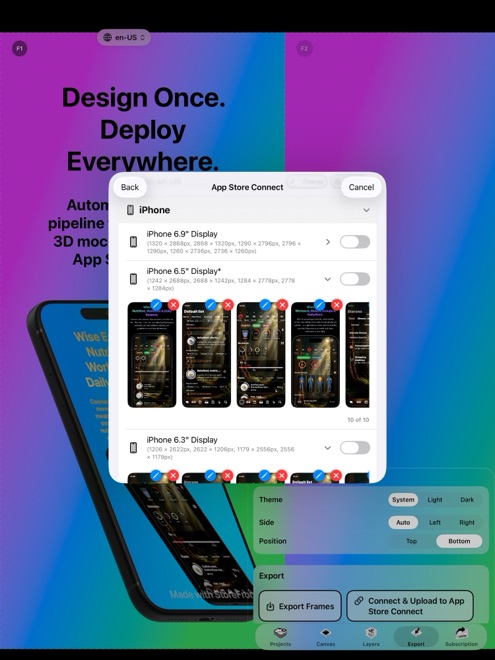
Leaving English-only screenshots on non-English App Store storefronts leaks conversions from shoppers who discovered your localized title or keywords, yet jumping straight to all 39 App Store Connect locales is daunting if you upload manually. Combining StoreFront Studio’s on-canvas AI storefront copywriter with one-click App Store Connect API bulk uploads makes both a 10-language rollout and a full 39-locale matrix practical for small teams.
1. English-only vs Tier-1 10-locale vs full 39-locale coverage
App Store Connect supports up to 39 language localizations across global territories. Shipping English-only screenshots takes the least upfront work, but shoppers in Japan, Germany, France, South Korea, Brazil, and Spain judge app relevance visually inside search results within two seconds.
Most indie developers see the fastest return by starting with 8 to 12 high-purchasing-power locales where their app already functions cleanly, then expanding toward full 39-locale coverage once core headlines stabilize.
| Strategy | English-Only (en-US) | Core 8–12 Locales | Full 39 ASC Locales |
|---|---|---|---|
| File count (8 slides × iPhone + iPad) | 16 images | 128–192 images | Up to 624 images |
| Manual Safari upload feasibility | Easy (~5 minutes) | Painful (45+ minutes) | Practically unmanageable by hand |
| StoreFront Studio API upload effort | 1 bulk push | 1 bulk push | 1 bulk push |
| Visual trust in non-English search | Low in Asia, Europe & LatAm | Covers ~80%+ of non-English spend | Maximum global storefront parity |
2. Typography rules that survive German, French, and CJK scripts
Word-for-word spreadsheet translation breaks graphic layouts immediately: German, French, Spanish, and Russian headlines routinely expand 20% to 35% beyond concise English verbs, while Japanese, Korean, and Chinese pack dense meaning into fewer characters with different line-break rhythms.
StoreFront Studio’s built-in AI copywriter translates and culturally adapts headlines per storefront right on the canvas, letting you verify line wraps and re-position per-word gradient highlights on the actual translated verb before uploading.
| Language group | Typical headline shift | Canvas adjustment in StoreFront Studio |
|---|---|---|
| German, French, Spanish, Portuguese | +20% to +35% character length | Leave side padding & 3-line headroom on English master |
| Japanese, Korean, Simplified/Trad. Chinese | Compact glyph count; no spaces in JA/ZH | Check natural phrase breaks & bold CJK weight clarity |
| Per-word inline gradient highlights | Target verb often moves to clause end | Re-apply inline word gradient to the translated payoff word |
| In-app UI honesty check | Guideline 2.3 metadata accuracy | Never imply translated in-app UI if binary itself is English-only |
3. Keeping localized screenshots current on future app updates
Teams abandon localized screenshots when updating version 1.4 requires paying per-locale SaaS surcharges or spending half a Friday re-uploading PNGs. Because StoreFront Studio charges zero per-locale fees ($3.99/mo, $39.99/yr, or $49.99 once forever) and keeps your .p8 key in your local Keychain, refreshing twenty languages on release day stays a single push.
Just make sure every target localization is enabled on your editable Prepare for Submission version in App Store Connect before running the upload.
| Update task | Manual Design + Safari | StoreFront Studio Workflow |
|---|---|---|
| Add 1 new feature slide to 12 locales | Clone 24 artboards, export, drag 24 slots | Stage once, adapt copy on canvas, run 1 bulk API upload |
| Per-language software fees | $0 (high manual labor) | $0 extra — flat Pro IAP covers unlimited locales |
| Credential security during upload | Manual browser login | Local Apple Keychain .p8 key over TLS to Apple |
Can I localize screenshot headlines even if my app UI is still in English?
Be careful: localized headlines help explain value, but never doctor UI screens or imply the app interface is translated if the downloaded binary only runs in English. Full UI + headline localization converts best.
Does StoreFront Studio charge extra to translate or upload 20+ languages?
No. Neither Free nor Pro charges per-locale fees; Pro ($3.99/mo, $39.99/yr, or $49.99 lifetime) removes ads and export watermarks across unlimited languages.
Does StoreFront Studio’s AI copywriter send my project data automatically?
No. Only the app text you explicitly provide when requesting a headline or translation is sent to generate the draft.
Why did one locale fail during an App Store Connect API upload?
Usually that specific localization has not been added to the new editable app version in App Store Connect yet; enable the locale in ASC and re-run the upload.