StoreFront Studio vs Official Apple Bezel PNGs: interactive 3D lighting vs flat static frames
Apple Design Resources provides free official flat PNG and PSD product bezels for straight-on marketing graphics. What static Apple bezel files cannot do is turn ten degrees in 3D space, catch studio rim lighting against a dark canvas, adapt headlines across 6.9-inch iPhone and 13-inch iPad canvases, or upload localized sets to App Store Connect — all built directly into StoreFront Studio.
1. Interactive RealityKit 3D geometry vs flat front-on PNG cutouts
Official Apple bezel downloads are static front-facing 2D images. If your app uses a dark interface on a dark background, a flat dark bezel blends into the backdrop; if you try skewing a 2D bezel PNG in an image editor to fake perspective, the chassis thickness disappears and looks paper-thin.
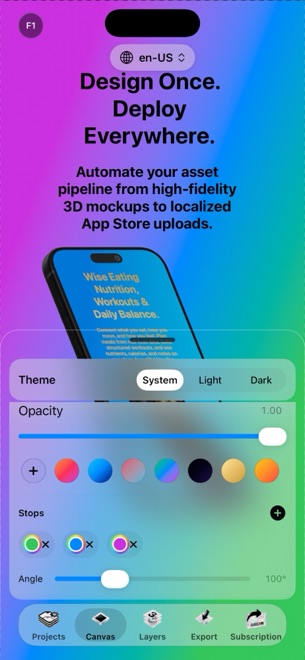
StoreFront Studio renders iPhone and iPad hardware in real 3D space with RealityKit. Every generation has an exact 3D frame with real side depth, toggleable physical materials, adjustable studio lighting, and optional depth of field — while also letting you set a clean 0-degree front-facing pose whenever you want pure flat clarity.
| Visual property | StoreFront Studio | Apple Design Resources Bezels |
|---|---|---|
| Geometry | Real 3D RealityKit models with true chassis depth | Flat 2D front-facing PNG / PSD files |
| Perspective & camera angles | Any 3D rotation, scale & position — including 0° front-on | Locked strictly to 0° flat front view |
| Lighting & edge separation | Adjustable studio light & physically accurate materials | Baked static highlights only |
| Screen masking effort | Automatic exact fit when you pick your screenshot | Manual layer masking & corner-radius clipping per screen |
2. From isolated bezel asset to complete localized storefront
Downloading a folder of Apple bezel PNGs still leaves you needing a canvas editor for Exact-Spec App Store backgrounds, a typography tool for headlines, manual artboard duplication for iPad, a spreadsheet for translations, and Safari for uploading.
StoreFront Studio wraps the entire workflow into one native iOS 26, iPadOS, and macOS app: multi-color background and per-word text gradients, multi-size layout adaptation, on-canvas AI copywriting, and bulk App Store Connect API upload.
| Step | StoreFront Studio | Apple Bezel PNGs + External Editor |
|---|---|---|
| Canvas dimensions | Built-in 6.9", 6.5", 13" iPad & legacy App Store Connect slots | Must configure manually in external design app |
| Headline typography | Inline per-word colors & linear/radial gradients built in | Depends on external image editor |
| Localization & copy | On-canvas AI copywriter & storefront adaptation | Manual text duplication |
| App Store Connect upload | Direct bulk API upload from local Keychain .p8 key | Manual export + browser drag-and-drop |
3. Cost and compliance notes
Apple’s downloadable bezels are free under Apple’s marketing guidelines, making them useful for press kits or documentation pages where you already work inside Figma or InDesign. StoreFront Studio uses device frames under Apple’s marketing guidelines while eliminating hours of manual masking and uploading.
Design your entire set free in StoreFront Studio, and unlock clean ad-free, watermark-free exports with Pro ($3.99/mo, $39.99/yr, or $49.99 lifetime).
| Use case | Best choice | Why |
|---|---|---|
| Press-kit PDFs or print layouts in InDesign | Official Apple Bezel PNG/PSD | Drop static front-on asset into existing print layout |
| App Store search & product page screenshots | StoreFront Studio | 3D depth, rim light, gradient headlines & 1-click ASC upload |
| Updating screenshots across 5+ languages | StoreFront Studio | Avoids re-masking dozens of PNG layers by hand |
Can I still make straight front-facing screenshots in StoreFront Studio?
Yes. You can keep RealityKit 3D models at zero rotation for crisp front-on screens on detail slides while enjoying studio lighting and automatic screen fitting.
Why do 2D PNG bezels look flat when skewed in Photoshop or Figma?
A 2D PNG has no 3D side rails, button geometry, or specular lighting normals, so skewing it stretches flat pixels instead of revealing the titanium edge.
Does StoreFront Studio include both iPhone and iPad hardware generations?
Yes. Every device generation has a matching RealityKit 3D model for iPhone and iPad.
Do I have to upload my screenshots manually after framing them?
No. StoreFront Studio uploads every device size and localized storefront directly to App Store Connect via Apple’s official API.