StoreFront Studio vs Apple Keynote for App Store Screenshots: 3D, multi-size & ASC push
Using Apple Keynote with custom slide dimensions is a classic zero-budget indie hack for throwing together quick 2D screenshots on launch night. As soon as you add 13-inch iPad requirements, angled 3D hardware frames, per-word gradient headlines, or multiple languages, maintaining separate Keynote `.key` decks and dragging exported slides into Safari becomes far slower than StoreFront Studio.
1. RealityKit 3D hardware & inline gradients vs flat Keynote slides
Keynote locks a presentation to one single slide size per file — for example, 1320 × 2868 pt — and treats phone frames as flat pasted PNG images. You cannot rotate an iPhone in 3D space, light its titanium bezel against a dark backdrop, or apply a gradient to a single word inside a headline without awkward stacked text boxes.
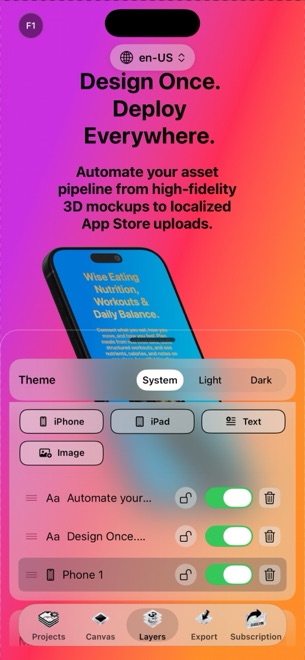
StoreFront Studio gives you real RealityKit 3D iPhone and iPad models with studio lighting, physical materials, and depth of field, paired with a headline engine built specifically for inline per-word colors and multi-stop gradients.
| Feature | StoreFront Studio | Apple Keynote |
|---|---|---|
| Device mockups | Interactive RealityKit 3D models for every iPhone & iPad gen | Manual paste & mask with flat 2D bezel PNGs |
| Multiple Apple sizes in one project | Yes — one canvas adapts to 6.9", 6.5", 13" iPad & legacy slots | No — requires separate .key files per pixel dimension |
| Per-word gradient inside sentence | Built in natively within a single text layer | Not supported on individual words in one text box |
| Export resolution pitfalls | Exact App Store Connect pixel output | Point-to-pixel export settings can mismatch ASC specs |
2. Updating multi-device & multi-language sets over time
If you ship an iPhone + iPad app in five languages using Keynote, you end up juggling ten separate `.key` files. Changing one headline or fixing a screenshot means opening ten decks, exporting a hundred PNGs, renaming `Slide.001.png` files, and dragging them into Safari.
In StoreFront Studio, one project holds your multi-size layout and storefront translations together — and one bulk upload sends every size and language directly to App Store Connect via your local Keychain .p8 key.
| Release chore | StoreFront Studio | Apple Keynote |
|---|---|---|
| Adding 5 storefronts + iPad size | Same project: AI copy adaptation + responsive review | 10 separate Keynote decks to keep in sync manually |
| App Store Connect delivery | Direct bulk API upload from app | Export Images → Finder folders → Safari drag-and-drop |
| AI headline copywriting | Built-in App Store-aware headline & translation helper | Manual writing |
| Runs on iPhone, iPad & Mac | Yes (iOS 26, iPadOS & macOS) | Yes (Apple devices) |
3. Cost vs release-night sanity
Keynote comes free on every Mac, iPad, and iPhone, making it fine for an internal prototype or single-locale MVP when budget is strictly zero. Remember, however, that StoreFront Studio is also free to download and design in with zero account required.
When you want clean, watermark-free production screenshots without managing ten `.key` files, StoreFront Studio Pro is $3.99/month, $39.99/year, or $49.99 once forever.
| Situation | Recommended choice | Why |
|---|---|---|
| Pitch decks, WWDC-style slides & internal demos | Apple Keynote | Masterful slide transitions, presenter notes & charts |
| Single-app or multi-app App Store listings in 3D | StoreFront Studio | Real 3D hardware, 1-canvas iPad scaling & direct ASC upload |
| Fast post-launch screenshot updates across languages | StoreFront Studio | Eliminates multi-deck duplication and manual Safari uploads |
Why do Keynote PNG exports sometimes fail App Store Connect dimension checks?
Keynote slide sizes and image export presets can output 1080p or 2x scaled dimensions that miss Apple’s exact 1320 × 2868 or 2064 × 2752 pixel slots, or include alpha transparency if "Transparent backgrounds" is ticked.
Can StoreFront Studio handle both iPhone and 13-inch iPad in a single project?
Yes. Unlike Keynote, which locks one slide size per file, StoreFront Studio adapts one design across required iPhone and iPad dimensions.
Does StoreFront Studio require learning complex 3D software?
No. Placing a screenshot onto a RealityKit 3D iPhone or iPad and rotating or lighting it is just as approachable as moving a shape on a slide.
How much does StoreFront Studio cost to remove the export watermark?
StoreFront Studio Pro costs $3.99/month, $39.99/year, or $49.99 as a one-time lifetime purchase.