StoreFront Studio vs Canva for App Store Screenshots: exact Apple specs, 3D & API push
Canva is terrific for social media posts, pitch decks, and blog banners, yet generic Canva phone templates routinely trip up App Store submissions with wrong aspect ratios, outdated bezels, and manual file-renaming chores. StoreFront Studio is engineered specifically around Apple’s exact 6.9-inch iPhone and 13-inch iPad dimensions, live RealityKit 3D hardware, and one-step App Store Connect API uploads.
1. Exact App Store Connect pixel specs vs generic social canvases
In Canva, searching "app screenshot" surfaces dozens of Instagram Story (1080 × 1920) graphics that App Store Connect immediately refuses because Apple requires exact pixel slots such as 1320 × 2868 px (6.9-inch iPhone) and 2064 × 2752 px (13-inch iPad). Even Canva’s Magic Resize requires paid Pro access and still leaves iPhone bezels sitting awkwardly on iPad canvases.
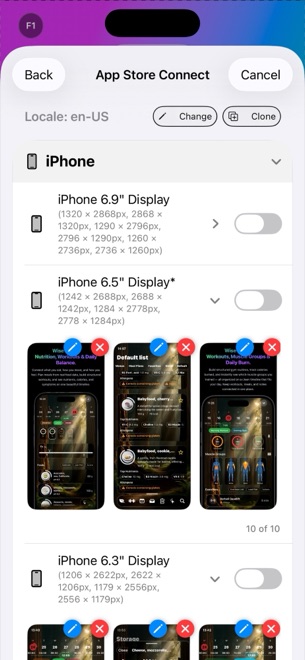
StoreFront Studio starts from every required App Store Connect dimension natively. One composition adapts cleanly across current and legacy iPhone and iPad slots with matching 3D hardware frames.
| Requirement | StoreFront Studio | Canva |
|---|---|---|
| Built-in Apple pixel dimensions | Exact 6.9", 6.5", 13" iPad & legacy ASC slots built in | Must enter custom pixel dimensions manually per doc |
| Multi-size layout adaptation | Included on one canvas (free to design, Pro to ship clean) | Magic Switch / Resize locked behind Canva Pro & generic |
| Device frame accuracy | Exact RealityKit 3D models per iPhone & iPad generation | Mixed generic flat frames & older notched cutouts |
| 3D lighting & camera rotation | Interactive 3D rotation, studio lighting, materials & DOF | Static 2D elements (or third-party mockup apps inside Canva) |
| Per-word inline gradient text | Native single-sentence per-word colors & gradients | Requires separate grouped word boxes for partial gradients |
2. Copy compliance, localization & App Store Connect upload
Canva knows nothing about App Store Review Guideline 2.3 metadata rules or App Store Connect localization slots: after exporting ten slides per size and language as ZIP files, you still face hours of manual browser uploads.
StoreFront Studio includes an AI copywriter focused specifically on App Store marketing guidelines — helping you write crisp, compliant benefit headlines and storefront adaptations — plus a direct bulk uploader connected to your local Keychain .p8 API key.
| Workflow step | StoreFront Studio | Canva |
|---|---|---|
| App Store-aware AI copywriting | Built-in headline & storefront translation assistant | General Magic Write (not tuned to Apple review rules) |
| Delivering 10 locales to ASC | Single bulk API upload directly from your device | Download multiple ZIPs and drag files per locale in Safari |
| Credential & project privacy | No account; projects & .p8 key stay on your Apple device | Canva account login; assets stored in Canva cloud |
| Accidental transparency errors | Exports opaque RGB files accepted by App Store Connect | Transparent PNG checkbox will cause ASC upload failure |
3. Cost comparison for app developers
If you already pay $120+/year for Canva Pro to run social media channels, Canva still leaves you resizing iPad screens by hand and uploading PNGs into Safari manually. If you do not pay for Canva Pro, StoreFront Studio Pro costs far less — $3.99/month, $39.99/year, or $49.99 once forever — while automating the entire Apple store pipeline.
Better yet, you can stage your entire 3D storefront in StoreFront Studio’s free version before spending a cent.
| Scenario | Recommended tool | Reason |
|---|---|---|
| App Store screenshots (iPhone, iPad & Mac) | StoreFront Studio | Exact ASC pixel slots, RealityKit 3D & direct API upload |
| Instagram carousels, TikTok covers & slide decks | Canva | Broad social media templates & stock photo library |
| Lowest multi-year screenshot cost | StoreFront Studio ($49.99 lifetime) | One-time Apple IAP beats $120+/yr ongoing design subscriptions |
Why did App Store Connect reject screenshots I exported from Canva?
Common culprits are 1080 × 1920 social dimensions instead of Apple’s 1320 × 2868 / 1290 × 2796 specs, transparent PNG backgrounds, or placing an iPhone bezel inside a 13-inch iPad slot.
Does StoreFront Studio work on iPhone and iPad like Canva’s mobile app?
Yes. StoreFront Studio runs natively across iOS 26, iPadOS, and macOS with full RealityKit 3D rendering and App Store Connect uploads on all three.
Is StoreFront Studio’s multi-size canvas locked behind a paywall while designing?
No. Multi-size layout adaptation, 3D models, gradients, AI copy, and ASC upload are all unlocked in Free; Pro removes ads and the export watermark.
Can StoreFront Studio style one word in a gradient without splitting text boxes?
Yes. You can apply distinct colors or multi-color linear and radial gradients to a single word inside one aligned sentence.