StoreFront Studio vs Figma App Store Templates: 3D stage & ASC push vs manual artboards
Figma is unbeatable for designing your app’s actual interface components, design systems, and custom vector illustrations. For shipping App Store screenshots across 6.9-inch iPhone, 13-inch iPad, and ten languages, however, cloning dozens of Figma frames, hunting 3D mockup plugins, and dragging 200 exported PNGs into Safari turns release day into hours of busywork that StoreFront Studio finishes from one native canvas.
1. Built-in RealityKit 3D hardware vs outdated community Figma frames
Most free Figma App Store screenshot templates rely on flat vector bezels or rasterized PNG mockups created two hardware cycles ago. Whenever you want an angled 3D iPhone with realistic titanium rim lighting, you have to buy paid third-party Figma plugins that bake flat bitmap layers every time you swap a screen capture.
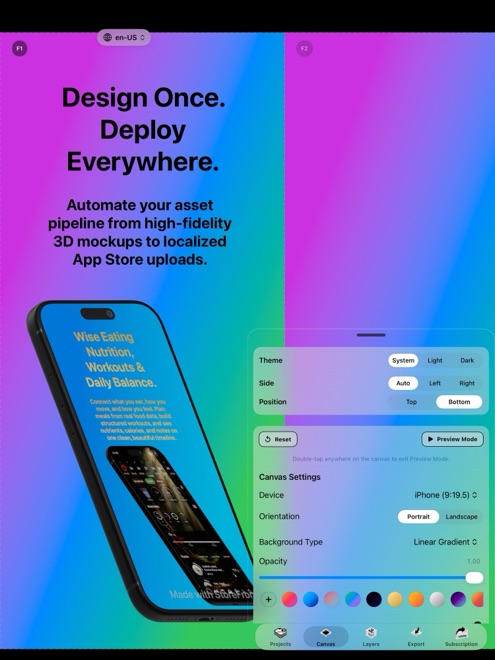
StoreFront Studio includes live RealityKit-rendered 3D models for every iPhone and iPad generation out of the box. Drop in a new Simulator screenshot and the 3D angle, physical materials, studio light, and depth of field stay live and editable.
| Design task | StoreFront Studio | Figma Screenshot Templates |
|---|---|---|
| 3D angled iPhone & iPad frames | Native live RealityKit 3D models with studio lighting | Flat vectors unless using paid third-party 3D plugins |
| Swapping updated UI captures | Replace image directly on live 3D device model | Re-run mockup plugin or re-mask smart layers per artboard |
| Per-word gradient headlines | Built-in inline color & gradient spans inside one text box | Requires vector flattening or awkward split text frames |
| Multi-size layout adaptation | One canvas follows to 6.9", 6.5", 13" iPad & older sizes | Maintain separate frame rows per pixel resolution |
| Accidental PNG alpha rejections | Exports opaque App Store-compliant images | Unchecked transparent frame backgrounds trigger ASC errors |
2. Multi-language matrix & App Store Connect upload speed
In Figma, supporting eight languages across iPhone and iPad means managing 160 separate artboards (or wiring brittle JSON variable plugins), exporting nested folders, and manually uploading slot by slot in App Store Connect.
StoreFront Studio keeps one project coherent across sizes and languages: draft or translate headlines on the canvas with the built-in AI copywriter, inspect line wraps across phone and tablet dimensions, and push the entire matrix straight to App Store Connect via your local Keychain API key.
| Workflow stage | StoreFront Studio | Figma Screenshot Templates |
|---|---|---|
| Headline drafting & translation | Built-in AI copywriter tuned for App Store rules & storefronts | Manual copy-paste or external localization plugins |
| Checking 10 slides × 2 sizes × 10 locales | Unified multi-size, multi-language review pass | 200 artboards to slice, name, export, and sort |
| Uploading to App Store Connect | One bulk upload via official Apple API (Keychain .p8) | Manual browser drag-and-drop (or custom Fastlane scripts) |
| Time for a single typo fix post-export | Edit once, re-run bulk API push in minutes | Re-export slices, unzip, and re-drag into Safari |
| Works natively on iPad & iPhone | Full native editor on iOS 26, iPadOS & macOS | Desktop-first web/Electron canvas |
3. When to keep Figma vs when to switch to StoreFront Studio
Keep Figma where it shines: designing your app’s UI, crafting custom marketing badges or vector diagrams, and collaborating across large product design teams. You can even drop custom graphic callouts exported from Figma onto StoreFront Studio’s layered canvas if desired.
For actual 3D device framing, multi-size scaling, storefront translation, and App Store Connect delivery, StoreFront Studio saves hours per release at $0 to design and $3.99/mo or $49.99 lifetime to ship clean.
| Use case | Best choice | Why |
|---|---|---|
| UI wireframing & custom vector illustrations | Figma | Full vector pen networks, Auto Layout & component libraries |
| 3D angled Apple screenshots + fast ASC upload | StoreFront Studio | Native RealityKit 3D + 1-canvas sizing + direct API upload |
| Multi-language indie app updates | StoreFront Studio | Eliminates 100+ cloned Figma frames and manual Safari uploads |
| Cost for screenshot production + 3D + upload | StoreFront Studio ($49.99 once) | Avoids stacking paid Figma seats + paid 3D mockup plugins |
Why do Figma PNG exports sometimes get rejected by App Store Connect?
If a Figma frame lacks a solid 100% opaque fill or exports with an alpha channel, App Store Connect rejects the PNG; StoreFront Studio exports flattened opaque images sized to Apple specs.
Can I achieve per-word gradient headlines without outlining text in StoreFront Studio?
Yes. StoreFront Studio’s text engine applies colors and linear or radial gradients to individual words inside a live, editable sentence — no outlining required.
Do I still need Figma if I use StoreFront Studio for my App Store listing?
Not for screenshots. Capture clean screens straight from Xcode Simulator or your physical iPhone and iPad, drop them into StoreFront Studio, and upload directly.
Does StoreFront Studio require plugins for 3D iPhones and iPads?
No. RealityKit 3D models for iPhone and iPad generations, studio lighting, materials, and depth of field are built directly into the app.