StoreFront Studio vs Sketch & Pixelmator Pro: dedicated App Store pipeline vs general Mac editors
Sketch and Pixelmator Pro are beloved native Apple design apps for UI design, vector icons, and photo editing. Neither, however, includes interactive 3D iPhone and iPad hardware models, automatic adaptation across every App Store Connect pixel slot, on-canvas storefront translation, or direct App Store Connect API uploads — the specialized release pipeline StoreFront Studio brings to Mac, iPad, and iPhone.
1. Built-in RealityKit 3D stage vs flat vector & bitmap layers
In Sketch or Pixelmator Pro, framing an app screen means importing flat Apple bezel PNGs or manually perspective-warping bitmaps, which flattens metallic edges and breaks as soon as you want a subtle 10-degree hero rotation with studio rim light.
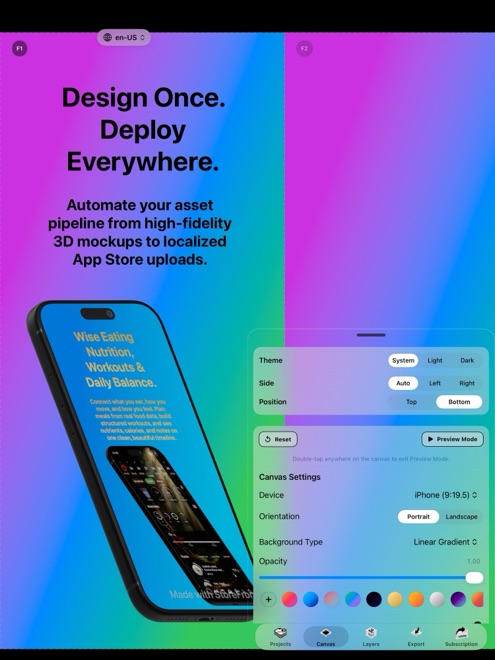
StoreFront Studio renders genuine 3D hardware models via RealityKit across macOS, iPadOS, and iOS 26. Rotate, scale, and position every iPhone and iPad generation in 3D space while keeping inline per-word gradient headlines live and editable.
| Capability | StoreFront Studio | Sketch / Pixelmator Pro |
|---|---|---|
| True 3D iPhone & iPad models | Built-in RealityKit 3D with studio light, materials & DOF | Not built in (flat PNG bezels or manual 2D perspective warp) |
| Inline per-word gradient text | Native per-word colors & gradients inside one sentence | Requires converting text to outlines/masks for word gradients |
| App Store multi-size adaptation | One canvas follows across 6.9", 6.5", 13" iPad & older sizes | Duplicate and manually resize artboards per resolution |
| Runs on iPhone, iPad & Mac | Full editor on all three (iOS 26, iPadOS, macOS) | Mac-focused (Sketch Mac editor; Pixelmator split editions) |
2. Eliminating the export-rename-drag Safari ritual
Even the fastest Mac designer dreads the post-export half of release day: slicing 60 to 200 artboards out of Sketch or Pixelmator Pro, checking that zero PNGs carry alpha transparency, sorting folders by locale, and dragging ten files at a time into App Store Connect.
StoreFront Studio pairs an App Store-aware AI copywriter (for headlines and storefront translations) with a direct bulk uploader that uses your local Keychain .p8 API key to populate App Store Connect in one operation.
| Release step | StoreFront Studio | Sketch / Pixelmator Pro |
|---|---|---|
| Drafting & localizing headlines | On-canvas AI copywriter tuned for App Store guidelines | Manual text duplication across artboards |
| Uploading to App Store Connect | Direct bulk API upload from local Apple Keychain | Export slices to Finder + manual Safari drag-and-drop |
| Updating one screenshot across 8 locales | Swap screen on 3D model once & re-push via API | Replace layer across 8–24 artboards, re-slice & re-upload |
| Account requirement | Zero account or cloud workspace needed | Local Mac files / Sketch workspace |
3. How Apple-native developers pair these tools
Design your app’s icon in Pixelmator Pro and wireframe its views in Sketch — they are fantastic native tools for general craft. Then hand finished Simulator captures to StoreFront Studio so your 3D store staging, iPad sizing, localization, and App Store Connect upload finish in under an hour.
StoreFront Studio is free to design in and offers a Mac-friendly $49.99 one-time lifetime Pro option (plus $3.99/mo or $39.99/yr).
| Job to be done | Recommended app | Why |
|---|---|---|
| App icons, photo retouching & illustration | Pixelmator Pro | Deep layer masks, brushes & RAW/photo filters |
| UI component libraries & app wireframes | Sketch | Symbols, vector precision & developer handoff |
| 3D App Store screenshots + bulk ASC upload | StoreFront Studio | RealityKit 3D hardware, 1-canvas sizing & direct API push |
Does StoreFront Studio feel like a native Mac app rather than a web wrapper?
Yes. StoreFront Studio runs natively on macOS, iPadOS, and iOS 26 using Apple’s RealityKit 3D engine and local system Keychain.
Can Sketch or Pixelmator Pro upload screenshots straight to App Store Connect?
No. Both export image files to disk, whereas StoreFront Studio uploads every device size and localized set directly via Apple’s App Store Connect API.
Does StoreFront Studio offer a one-time purchase for developers who dislike subscriptions?
Yes. Alongside $3.99/month and $39.99/year, StoreFront Studio Pro offers a $49.99 one-time lifetime purchase that never renews.
Are all 3D models unlocked in StoreFront Studio’s free version?
Yes. The entire editor, 3D hardware library, gradient text engine, AI copywriter, and ASC uploader work for free; Pro only removes ads and the export watermark.