StoreFront Studio vs Photoshop & Illustrator for App Store Screenshots: speed, 3D & cost
Adobe Photoshop and Illustrator remain unmatched when a game studio paints custom character art or composites complex photo scenes. For 95% of iOS, iPadOS, and macOS apps, however, wrangling multi-gigabyte Smart Object mockup PSDs, rebuilding artboards for 13-inch iPad, and manually exporting hundreds of localized JPEGs wastes hours that StoreFront Studio cuts down to one native 3D workflow.
1. Live RealityKit 3D hardware vs static Smart Object PSD files
In Photoshop, angling a device means buying a third-party PSD pack locked to one pre-rendered camera angle. If that angle makes slide three’s chart hard to read — or when Apple ships a new iPhone chassis — you cannot rotate the PSD; you have to buy and re-rig an entirely new file.
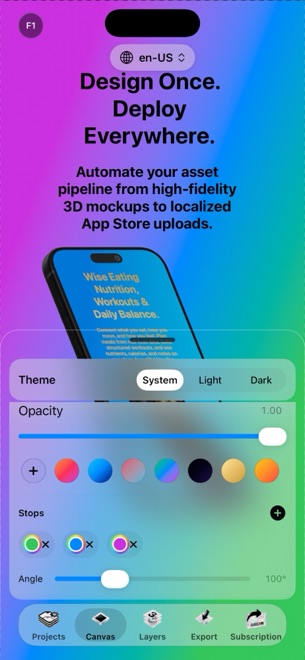
StoreFront Studio renders real 3D iPhone and iPad models live via RealityKit. Rotate any device by five degrees, flip studio lighting, toggle physical materials or depth of field, and see the update instantly without nested Smart Object windows.
| Task | StoreFront Studio | Photoshop / Illustrator |
|---|---|---|
| 3D device angle & light changes | Real-time RealityKit 3D sliders on live models | Fixed to static angle of purchased Smart Object PSD |
| Swapping an updated app screen | Drop image directly onto 3D model in one click | Double-click Smart Object, paste, save .psb, wait to re-render |
| Per-word gradient headlines | Live editable inline text spans & gradients | Requires clipping masks or outlined vector type |
| Project file footprint | Lightweight native local projects | Multi-gigabyte layered PSD / PSB archives |
| Runs natively across iPhone, iPad & Mac | Identical full feature set across all three | Separate desktop apps vs pared-down mobile editions |
2. Multi-size scaling, localization & App Store Connect upload
Neither Photoshop nor Illustrator knows what App Store Connect is. Shipping ten slides across iPhone 6.9-inch, iPhone 6.5-inch, and 13-inch iPad in six languages requires Data Sets/Actions scripting or 180 manual slice exports, followed by dragging every folder into Safari.
StoreFront Studio adapts one master canvas across required Apple dimensions, translates and adapts storefront headlines on the canvas via its AI copywriter, and uploads the entire localized matrix straight to App Store Connect from your local Keychain.
| Release step | StoreFront Studio | Photoshop / Illustrator |
|---|---|---|
| Responsive Apple display sizes | One canvas adapts across 6.9", 6.5", 13" iPad & legacy slots | Separate artboards & manual Smart Object scaling |
| On-canvas storefront copy & translation | Built-in App Store-aware AI copywriter | Manual copy-paste or CSV Data Variables setup |
| Direct App Store Connect upload | Yes — bulk API upload via local Keychain .p8 key | No — export files to disk and drag into browser |
| Alpha-channel rejection safety | Exports compliant flattened RGB assets | Easy to accidentally leave PNG transparency enabled |
3. Creative Cloud recurring fees vs $49.99 once forever
Maintaining Adobe Creative Cloud apps solely to update App Store screenshots costs hundreds of dollars every year plus steep cancellation terms. StoreFront Studio is free to design in, $3.99/month for a quick release sprint, $39.99/year, or $49.99 once forever.
Even studios that already keep Photoshop for game art or icons often adopt StoreFront Studio specifically to automate 3D framing, localization, and App Store Connect uploads.
| Scenario | Best choice | Why |
|---|---|---|
| Painted game key art & raw photo retouching | Adobe Photoshop / Illustrator | Pixel-level brushes, masking & bespoke vector illustration |
| 3D iPhone/iPad screenshots + multi-locale ASC upload | StoreFront Studio | Live RealityKit 3D + 1-canvas sizing + direct API delivery |
| Multi-year cost for screenshot production | StoreFront Studio ($49.99 lifetime) | One-time purchase vs ongoing Creative Cloud subscriptions |
Can I import custom badges or backgrounds made in Photoshop into StoreFront Studio?
Yes, and you can also build multi-color linear and radial gradients, borders, and rounded layers directly inside StoreFront Studio without opening Photoshop.
Why is RealityKit 3D faster than Photoshop Smart Object mockups?
RealityKit renders real 3D geometry live on Apple GPUs, letting you change camera angles and lighting anytime instead of buying separate static angle PSDs.
Does StoreFront Studio upload directly to App Store Connect?
Yes. It connects using your official App Store Connect API key stored in your local Apple Keychain and pushes all sizes and languages in one bulk upload.
Is there a subscription lock-in with StoreFront Studio?
No. Choose $3.99/month (cancel anytime in Apple Settings), $39.99/year, or a $49.99 one-time lifetime purchase.