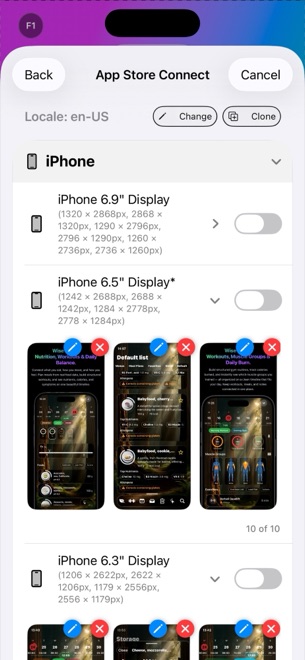
StoreFront Studio vs Shots.so: App Store Connect multi-size sets vs social mockup shots
Shots.so is a slick browser tool for framing single screenshots, X/Twitter posts, and landing-page hero graphics. Shipping an actual App Store release, however, demands ten coordinated slides, exact 6.9-inch iPhone and 13-inch iPad pixel dimensions, localized headlines, and bulk App Store Connect uploads — the exact production workflow StoreFront Studio is built around.
1. Purpose-built App Store dimensions vs social-first aspect ratios
Shots.so shines when you want a quick 16:9 or 4:5 aesthetic card to share a build-in-public update on X or Dribbble. When you turn to App Store Connect, however, social aspect ratios fail validation immediately: Apple enforces strict pixel slots such as 1320 × 2868 px for 6.9-inch iPhone and 2064 × 2752 px for 13-inch iPad.
StoreFront Studio builds your entire multi-slide storefront on one native canvas that adapts automatically across every required current and legacy App Store dimension.
| Dimension | StoreFront Studio | Shots.so |
|---|---|---|
| Primary design target | Multi-slide Apple App Store listings (iPhone & iPad) | Single social media shots, browser windows & hero cards |
| Exact Apple ASC pixel slots | Built in (6.9", 6.5", 13" iPad & older required sizes) | Social presets (16:9, 1:1, 4:5) + custom sizing |
| 3D hardware engine | Native RealityKit 3D iPhone & iPad models + studio lighting | Browser mockup presets & angled frames |
| Headline & inline gradient engine | Desktop fonts + per-word colors & gradients in one sentence | Minimal social caption overlays |
| Browser / code / tweet frames | Not included (focused on iPhone & iPad App Store hardware) | Included for social & web sharing |
2. Scaling to 10 slides, multiple locales, and App Store Connect
Crafting one pretty graphic in a browser takes five minutes; repeating that manually across eight slides, three Apple screen sizes, and ten languages produces 240 separate downloads with zero link to App Store Connect.
StoreFront Studio pairs an App Store guideline-aware AI copywriter (for headlines and storefront translations) with a direct App Store Connect API uploader powered by your local Apple Keychain .p8 key.
| Task | StoreFront Studio | Shots.so |
|---|---|---|
| Managing a 5–10 slide sequence | Cohesive multi-slide App Store project canvas | Single-shot oriented workflow |
| Translating for global storefronts | Built-in AI copywriter & storefront adaptation on canvas | Manual re-typing per exported graphic |
| Uploading to App Store Connect | One bulk API push across all sizes & locales | Manual export & Safari drag-and-drop |
| Native offline app | Runs natively on Mac, iPad & iPhone (no account) | Web browser app |
3. Using each tool for the job it was built for
Many indie developers happily use Shots.so when tweeting a quick macOS window snippet, and switch to StoreFront Studio the moment it is time to build, localize, and publish real iPhone and iPad App Store listings.
With a free full-featured editor and Pro priced at $3.99/month, $39.99/year, or $49.99 once forever, StoreFront Studio removes hours of App Store release friction.
| Scenario | Best tool | Why |
|---|---|---|
| Sharing a single changelog card on X / LinkedIn | Shots.so | Fast 16:9 social ratios and browser window frames |
| Submitting iPhone & 13" iPad screenshots to Apple | StoreFront Studio | Exact ASC pixel compliance, 3D models & zero alpha errors |
| Localizing & pushing 10+ App Store territories | StoreFront Studio | On-canvas AI translation + local Keychain bulk API upload |
Can Shots.so automatically adapt an iPhone set to 13-inch iPad and upload to ASC?
No. Shots.so is designed around single social mockups and exports, whereas StoreFront Studio adapts across Apple store sizes and uploads directly via the App Store Connect API.
Does StoreFront Studio support per-word gradient headlines?
Yes. You can highlight any single word in a sentence with a distinct color or multi-stop linear/radial gradient without splitting text layers.
Do I need an account to use StoreFront Studio?
No. There is nothing to sign up for; projects stay on your device and Pro uses standard Apple In-App Purchase.
How much does StoreFront Studio Pro cost?
Pro is $3.99/month, $39.99/year, or $49.99 as a one-time lifetime purchase — removing ads and the export watermark.