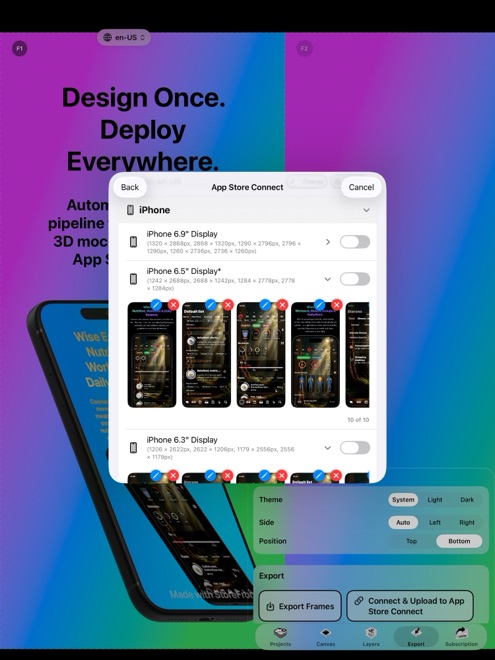
How to Upload Screenshots to 30+ App Store Locales via API Without Fastlane
Maintaining a Ruby environment, Bundler lockfiles, and Fastlane `deliver` folder trees just to upload localized App Store screenshots breaks down every time macOS updates system Ruby or Apple changes a display slot name. StoreFront Studio includes a native App Store Connect API uploader on Mac, iPad, and iPhone that pushes every size and localized storefront directly from the editor.
Compare Safari drag-and-drop, Fastlane deliver, and native API upload
When you ship an app in twenty or thirty languages across iPhone and 13-inch iPad, uploading 400 to 600 image files by hand in Safari takes hours and invites human error. Yet CLI scripts still require exporting gigabytes of intermediate folders and matching strict directory names.
| Workflow | Setup Required | How Credentials Are Stored | Handles 3D Layout + Translation + Upload? |
|---|---|---|---|
| StoreFront Studio Native API Push | Import Issuer ID, Key ID & .p8 once | Local iOS / iPadOS / macOS Keychain | Yes — design, translate, and push in one app |
| Fastlane deliver CLI | Ruby, Bundler, Fastfile, exact locale folder tree | Local .env or CI secrets | Upload only — design and resizing happen elsewhere |
| App Store Connect Web UI (Safari) | Browser login + 2FA | Apple ID web session | Manual dropdown switching per language and device |
How to push 30+ localized screenshot sets in 4 steps
Because StoreFront Studio talks directly to Apple's official App Store Connect REST API over TLS, there are no third-party servers or command-line scripts in the middle.
- In App Store Connect > Users and Access > Integrations > App Store Connect API, generate a Team Key with App Manager or Admin role and download the `.p8` file.
- Import the Issuer ID, Key ID, and `.p8` key into StoreFront Studio; the app secures them inside your local device Keychain.
- Translate and review your screenshot headlines across your target storefronts right on the StoreFront Studio canvas.
- Select your editable app version in StoreFront Studio and start the bulk upload to push all configured locales and display sizes to App Store Connect.
Make sure target localizations exist on your draft version first
Before triggering a bulk push, confirm that your upcoming version in App Store Connect is in an editable state (such as Prepare for Submission) and that you have added the target language localizations to that version. Upgrade to StoreFront Studio Pro ($3.99/month, $39.99/year, or $49.99 lifetime) before your final production push so exported assets have no watermark.
Does StoreFront Studio upload my .p8 API key to an external cloud server?
Never. Your Issuer ID, Key ID, and .p8 private key remain in your local Apple Keychain and communicate exclusively with Apple's official App Store Connect API over TLS.
Do I need Xcode or Ruby installed on my iPad to upload screenshots to App Store Connect?
No. Because the uploader is built natively into StoreFront Studio, you can push multi-locale screenshot sets directly from an iPad, iPhone, or Mac.
Why did one language fail during a multi-locale API push?
Usually that specific locale has not been enabled yet on the draft version in App Store Connect, or the version is locked in Ready for Sale.