
Arabic (Saudi Arabia & MENA) [ar-SA] — Localizing In-Screen Currency, Units & Date Formats
Practical App Store screenshot localization playbook for Arabic (Saudi Arabia & MENA) (App Store Connect locale code: ar-SA)—covering Localizing In-Screen Currency, Units & Date Formats, -5% Width, +20% Line Height typography rules, and one-click API upload in StoreFront Studio.
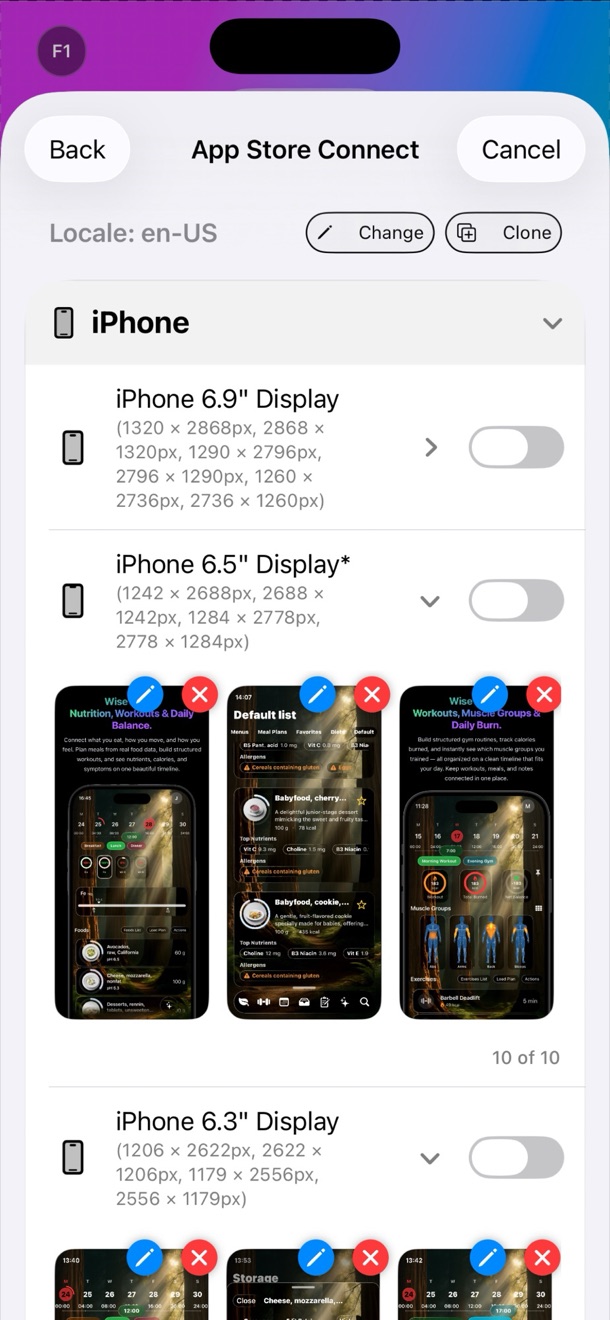
Shoppers in Arabic (Saudi Arabia & MENA) convert at significantly higher rates when your first three search screenshots speak their native language with idiomatic outcome headlines rather than awkward machine translations or clipped text boxes. StoreFront Studio (id6757389314) adapts your 3D iPhone and iPad screenshots for ar-SA and uploads them straight to App Store Connect.
1. Typography, Layout & Cultural Rules for Arabic (Saudi Arabia & MENA)
| Localization Dimension | Requirement for Arabic (Saudi Arabia & MENA) (ar-SA) | How StoreFront Studio Handles It |
|---|---|---|
| Text Expansion / Density | -5% Width, +20% Line Height | Dynamic text box sizing and per-locale font scale prevent headline clipping or 3D bezel collisions. |
| Reading Direction & Angle | RTL | Preserves or mirrors 3D RealityKit device yaw and headline alignment per locale. |
| Cultural & Linguistic Rule | Right-to-Left (RTL) slide order, connected cursive shaping & mirrored 3D tilt | Built-in AI copywriter generates punchy, native 5-word hooks tailored to Arabic (Saudi Arabia & MENA). |
| Per-Word Gradient Emphasis | Highlight the primary benefit verb or noun in ar-SA | Retains per-word linear/radial gradient styling across all 39 localized variants. |
2. Automating ar-SA Uploads Without Fastlane or Safari Drag-and-Drop
Manually uploading 10 iPhone 6.9" and 10 iPad 13" screenshots for ar-SA in Safari—and repeating that across 39 locales—means dragging 780 individual PNG files. In StoreFront Studio, your official App Store Connect .p8 API key stays safely inside your local Apple Keychain and pushes every localized slot in one batch.
Related 39-Locale App Store Localization Playbooks
Frequently Asked Questions
Arabic (Saudi Arabia & MENA) exhibits -5% Width, +20% Line Height. StoreFront Studio lets you preview ar-SA on both 6.9-inch iPhone and 13-inch iPad canvases and uses AI copywriting to craft concise native headlines that never clip.
Yes. StoreFront Studio connects directly to the official App Store Connect API using your local Keychain .p8 key and uploads your ar-SA screenshots automatically.